launch · founder-story · product
Why I built DrawShot
I built DrawShot because most screenshots are messages, not files. Existing tools optimize for saving and organizing; DrawShot optimizes for the fewest keystrokes between seeing something and pasting it to someone — capture, annotate, and copy to your clipboard in about 4 seconds, with no account or cloud.
For the past three years I've taken roughly 40 screenshots a day. Most are for Slack messages — "this button is broken," "look at this number," "the copy on this page is off." A few are for design reviews, a few for documentation, the rest are throwaway context for a thread I'll forget about in an hour.
Every one of those screenshots went through the same loop:
⌘⇧4, draw a region, release.- File lands on Desktop as
Screenshot 2026-04-23 at 10.42.png. - Open in Preview or Markup, draw an arrow.
- Save, drag the file into Slack, hit send.
- Delete the file from Desktop later (or, more honestly, never).
Best case, that's 30 seconds. Average, more like 45. I do this 40 times a day. That's 20 minutes of context-switching busywork between me and the actual conversation I'm trying to have.
I tried the tools that promised to fix this. The leading paid alternative is excellent and well-built; it also costs around $29 plus a $19/year cloud subscription, which is reasonable but felt like a lot for what I needed. Shottr is free and fast but the annotation experience felt like it was bolted on. Snagit is for a different audience. Native macOS Markup is fine but kicks you into a Finder workflow that defeats the speed.
None of them felt like what I'd build if I were starting from the question: how fast can we get from "I want to point at this" to "it's in the other person's hands"?
So in March, I started building it.
The thesis in one sentence
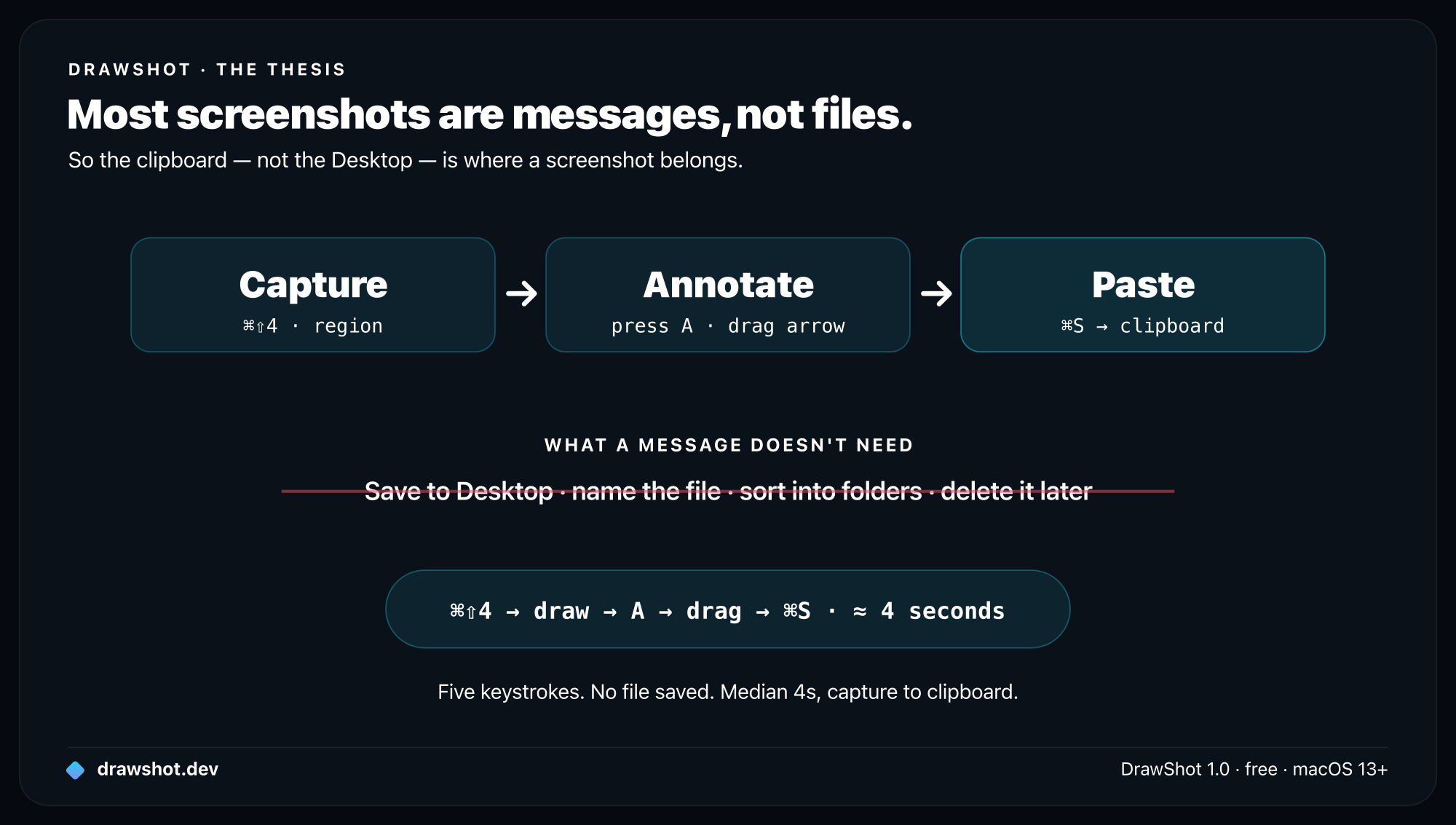
Most screenshots are messages, not files.
About 80% of the captures I took during a one-week instrumented test of my own workflow ended their lives pasted into Slack, Linear, or a comment thread. They were never reopened. They were never organized. They didn't need a filename. They didn't even need to exist on disk.
Treating screenshots as files — saving them to Desktop, naming them, sorting them — is the legacy of an era when "share an image" meant "attach a file to an email." That era ended.
The right primitive for a screenshot today is the clipboard. Capture → annotate → paste. The file system is optional.
This shifts what the tool should optimize for. Not file management. Not organization. Not cloud uploads. Just: what's the minimum number of keystrokes between seeing something and pointing at it for someone else?
For DrawShot, the answer is ⌘⇧4 → draw region → A → drag arrow → ⌘S. Five inputs. Median time in user testing: 4 seconds.
Why now
Two things made now the right moment.
First, Apple Silicon makes the capture pipeline near-instant. A 5K capture on an M2 takes under 50ms to read, decode, and present in the annotation canvas. Five years ago, the same pipeline on an Intel Mac took 300–400ms — slow enough that "speed" wasn't really a defensible differentiator. Now it is.
Second, the workflow patterns settled. Slack, Linear, Notion, GitHub all converged on rich-text inputs that accept pasted images natively. Five years ago you had to upload to imgur and paste a link. Now you paste and it works. The tool can assume the clipboard is the destination.
What I built
A small native macOS app. Universal binary. Local-only. Free.
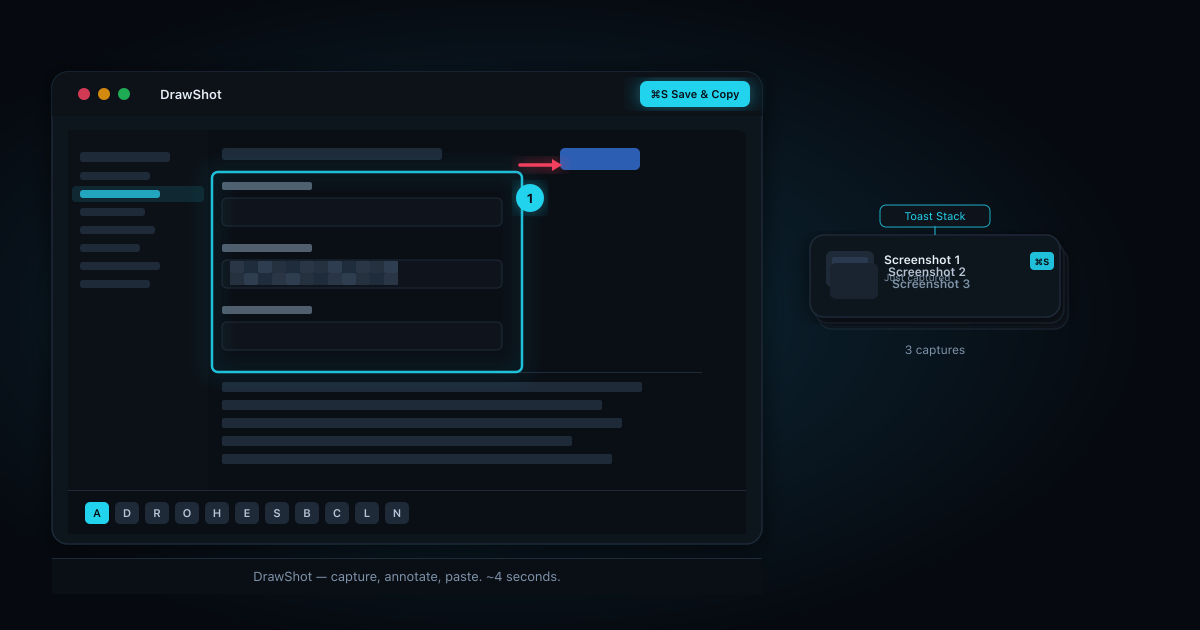
The whole thing is 11 annotation tools, each mapped to a single key. Draw (D), arrow (A), rectangle (R), circle (O), highlight (H), eraser (E), stamp (S), blur (B), crop (C), callout (L), step numbers (N). Four preset colors plus a custom wheel. Three stroke weights via [ and ]. Press the keys, draw the thing, paste it.
There's a toast stack that floats at the bottom of your screen — your recent captures, persistent across app switches and crashes. I'll write a whole post on why that pattern matters; the short version is that 5 of the 7 people I interviewed pre-build had lost annotations mid-edit because of some accidental escape key or app crash. Persistence is the cure.
There's no account. No telemetry. No cloud — more on why local-only, and what it costs. The one network connection is an optional once-a-day update check. You can block it in /etc/hosts and the app keeps working.
The hard parts
Three things I underestimated:
Hotkey ergonomics. A custom capture hotkey versus the native ⌘⇧4 is a real debate. macOS native uses ⌘⇧4. If I bind my own key, mine feels foreign; if I overwrite the system one, I steal muscle memory. I defaulted to riding the native ⌘⇧4 and made everything else remappable. That choice took longer than the actual region picker.
The annotation engine. Drawing a smooth arrow with a snappy arrowhead, that locks to 45° angles when you hold Shift, that re-renders fast on a 6K canvas — none of those are hard individually, all of them together took two weeks. The "smoothed pen stroke" (Catmull-Rom curves) alone was three days of fiddling.
Saying no. Beta testers wanted: cloud sync, team libraries, AI annotations, video clips, iPad app, Windows port. Every one of those would make DrawShot less of what I want it to be — a fast capture tool — and more of what every other tool already is.
What's next
DrawShot 1.0 ships today. It's free, and the free tier will stay fully featured. No bait-and-switch where I paywall ⌘S later.
Later this year I'll add a Pro tier with brand palettes, library mode, and a couple of integrations (Linear, GitHub, Jira). Pro is opt-in, adds new things, and funds continued development. The roadmap is public at docs/roadmap.md.
If you try it and something feels off, email me — drawshot.dev/contact. I read everything personally.
Frequently asked questions
What is DrawShot? DrawShot is a small, free, local-only macOS app for capturing and annotating screenshots fast — 11 single-key tools, and ⌘S copies the annotated image straight to your clipboard. Median time from capture to clipboard is about 4 seconds, with no account, telemetry, or cloud.
Why build another macOS screenshot tool? Existing tools optimize for file management or cloud sharing. DrawShot starts from a different question — the fewest keystrokes between seeing something and pasting it to someone. Most screenshots are messages, not files, so the clipboard, not the Desktop, is the right destination.
Is DrawShot free? Yes. DrawShot 1.0 is free and the free tier stays fully featured — capture and ⌘S are never paywalled. A later opt-in Pro tier adds extras like brand palettes and integrations and funds development.
Download DrawShot — free — macOS 13+, no account.
— Shraddha
drawshot.dev · v1.0 · macOS 13+ · free
DrawShot — free macOS screenshot annotator
Annotate your first screenshot in under 30 seconds. No account, no signup.
— Shraddha Mittal
Related reading