product-thinking · design
Screenshots aren't files
Screenshots aren't files — for most people they're messages. In a logged week of 187 of my own captures, 91% were pasted somewhere within minutes and never reopened. That means the right primitive for a screenshot tool is the clipboard, not the Desktop.
Open your ~/Desktop folder. Count the files starting with Screenshot.
If you're like me a year ago, you have 80–150 of them. None named. Most undated in your memory. All a mix of:
- Captures you sent to a teammate and forgot to delete
- Captures you took "to come back to" and never did
- Captures of error messages that are no longer relevant
- Captures of receipts you should have filed and didn't
- Captures of memes
The screenshot tool that ships with your OS treats every one of these as a file. It generates a name, picks a folder, writes a binary, and walks away. The implicit model: a screenshot is a document, and you'll manage it like a document.
Almost none of us actually do that.
The instrumented week
In April 2026 I ran a small experiment on myself. I added a manual logger — every time I took a screenshot, I tagged what I did with it within the next 5 minutes. One week, 187 captures. Here's the breakdown:
| Outcome | Count | Share |
|---|---|---|
| Pasted into Slack / Linear / Notion within 2 minutes | 142 | 76% |
| Sent via iMessage or email | 18 | 10% |
| Saved to a project folder intentionally | 9 | 5% |
| Used in a doc / design file later | 6 | 3% |
| Forgotten on Desktop, deleted at end of week | 12 | 6% |
91% of my screenshots were sent somewhere within minutes and never reopened. They were communication, not storage.
I ran the same lightweight survey with the 7 people I interviewed during user research. The exact numbers varied — designers had more captures landing in Figma comments; PMs had more in Linear — but the shape was the same. The overwhelming majority of screenshots are in-flight messages, not artifacts to preserve.
What this means for tool design
If 90% of your captures are messages, the file system is the wrong primitive. The right primitive is the clipboard.
This sounds like a small distinction. It cascades into a lot of product decisions:
The default save location doesn't matter much. If you only save 5% of captures intentionally, you don't need to pick a clever folder strategy. Defaulting to ~/Pictures/DrawShot/ is fine. Letting the user change it is fine. Spending engineering time on "intelligent filing" is wasted — it solves a problem 5% of users have.
Filenames don't matter much either. Screenshot 2026-05-15 at 10.42.png is plenty. Auto-OCR'd filenames sound clever but solve a problem most people don't have, and the OCR is wrong often enough to make finding things harder.
Cloud sync is a different product. If captures are messages, syncing them across devices makes about as much sense as syncing your Slack drafts across devices. The message destination (Slack itself) handles the sync. The capture tool doesn't need to.
The clipboard pipeline matters a lot. Every keystroke between "capture" and "paste in Slack" is overhead. Native macOS takes ~6 keystrokes (capture, find file on Desktop, drag to Slack, wait for upload). DrawShot takes 2 (⌘⇧4 then ⌘S after annotating). The whole product is about closing that gap.
What about the 10% I do save?
When I do want to keep a capture — a receipt, a design reference, a bug repro that matters — I want to know explicitly that I'm saving it, and I want it to go somewhere I'll find it.
In DrawShot it's one key. ⌘S saves the edited image to ~/Pictures/DrawShot/ and — because "copy to clipboard on save" is on by default — drops it on the clipboard at the same time. Saving and sending are the same motion: no separate copy step, and no "where did that screenshot go?"
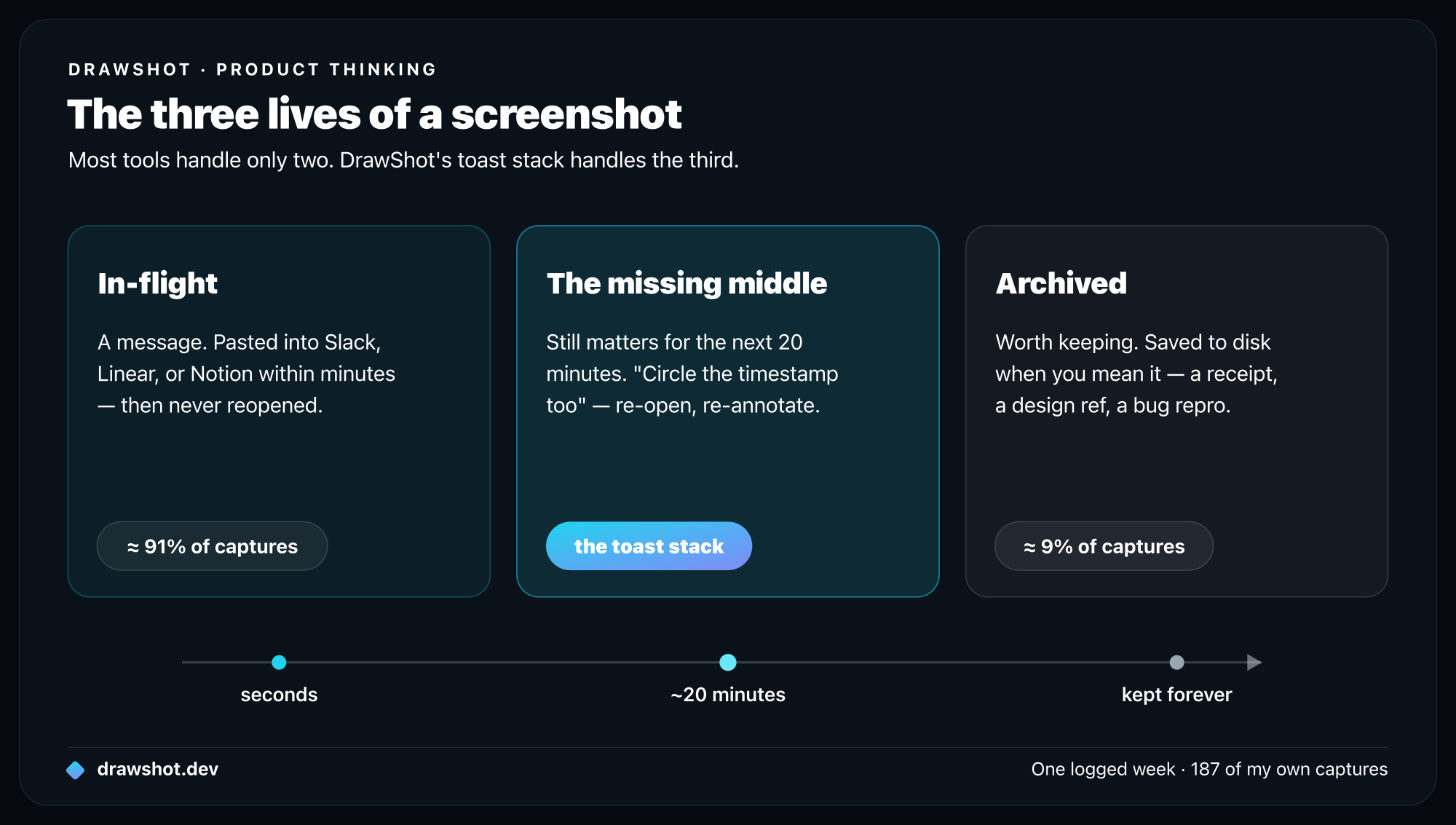
The toast stack as the missing middle
Between "in-flight, throw it away" and "archive on disk," there's a third state I hadn't seen treated well anywhere: captures that matter for the next 20 minutes but not forever.
You take a screenshot of an error. You paste it into a Slack thread. The conversation continues for 15 minutes, and someone asks "wait, can you also circle the timestamp on that?" You need to re-open and re-annotate the same capture. With every tool I tried, this meant either:
- Hoping the file was still on your Desktop (and digging through 80 others)
- Re-capturing the original screen state (often gone by now)
- Just describing the timestamp in text and giving up on the annotation
DrawShot's toast stack solves this. Your last few captures float at the bottom-right corner of your screen. They persist across app switches, sleep cycles, and crashes. Click one and the annotation canvas reopens, exactly where you left off.
This is the session memory that the file system can't give you — because the file system doesn't know what's in-flight versus what's archived. Only the tool knows.
What we lose by not treating screenshots as files
There are real tradeoffs to the "captures are messages" model:
- No long-term archive without explicit
⌘S. - No search across all your captures.
- No "show me every screenshot of the dashboard from last month."
I'm fine with those tradeoffs because the workflows that need them are rare, and when you do need them, you used ⌘S and the file is there.
The one I'm watching carefully: a capture you dismiss from the toast stack before pressing ⌘S is gone — it was never saved. The fix in DrawShot is a session retention setting (24h default), so even dismissed toasts can be recovered for a day before they're really gone.
A different way to think about screenshots
If you take a lot of them — and most people in software do — try this exercise. For one week, write down what happens to each screenshot you take.
I'd bet the breakdown looks like mine. Most are conversations. Some are artifacts. Very few are the long-tail "I'll come back to this" that the default tool optimizes for.
Frequently asked questions
Are screenshots files or messages? For most people, screenshots are messages, not files. In one logged week of 187 captures, 91% were pasted into Slack, Linear, or Notion within minutes and never reopened — only about 9% were intentionally kept. So the right primitive for a screenshot tool is the clipboard, not the file system.
Where do screenshots go on a Mac? By default, macOS saves every screenshot as a PNG on your Desktop. But since most captures are sent somewhere within minutes and never reopened, that pile mostly becomes clutter. DrawShot copies straight to the clipboard and only writes a file when you explicitly save.
How do I stop screenshots from cluttering my Desktop? Use a tool that treats captures as messages — copy to the clipboard and paste, without writing a file every time. In DrawShot, ⌘S saves and copies in one keystroke — copy-on-save is on by default, so the annotated image is paste-ready instantly while the file is auto-filed to ~/Pictures/DrawShot/ instead of cluttering your Desktop.
DrawShot is built for the breakdown that's actually true. Download DrawShot — free — macOS 13+, no account.
— Shraddha
drawshot.dev · v1.0 · macOS 13+ · free
DrawShot — free macOS screenshot annotator
Annotate your first screenshot in under 30 seconds. No account, no signup.
— Shraddha Mittal
Related reading