metrics · product-thinking
4 seconds to clipboard — the north-star metric
DrawShot puts an annotated screenshot on your clipboard in about 4 seconds — roughly 81% faster than the built-in macOS ⌘⇧4 + Preview Markup path. That speed has a name — time-to-clipboard (TTC) — and it's the single number I optimize the whole product around.
Every product needs one number that, if it gets worse, means the product got worse. For DrawShot, that number is time-to-clipboard (TTC) — the elapsed milliseconds between pressing the capture hotkey and the annotated image landing in your clipboard, ready to paste.
Today, on an M2 MacBook Air, the median TTC across a typical capture-and-annotate session is 4.1 seconds. Half are faster. The fastest path — a capture with no annotations — is around 1.4 seconds. The 90th percentile is around 7 seconds, mostly captures with three or more annotations.
This post is about why that number is the right one, how I measure it, and what I'd do if it got worse.
Why TTC, not something else
Other candidates I considered:
Captures per day. A vanity metric. More captures doesn't mean more useful captures. I'd rather you take 10 great ones than 50 wasted ones.
Retention. Important, but it's a downstream effect of the tool being good. If TTC is fast and the annotation feels right, retention takes care of itself.
Time spent in app. Actively bad as a goal — I want you to spend less time, not more.
Number of annotations per capture. A red herring. Most useful captures have 1–2 annotations. Heavy annotation often means the capture itself was the wrong rectangle.
Time-to-clipboard sits at the intersection of every product decision. Make the hotkey hard to reach? TTC goes up. Make the annotation toolbar require a mouse? TTC goes up. Make ⌘S confusing? TTC goes up. Make the capture pipeline slow to decode? TTC goes up.
If I'm optimizing the whole product around one number, TTC is the one that captures the whole product.
How I measure it
DrawShot has an internal TTC marker that runs in debug builds only. Two timestamps:
t_start— moment the hotkey is recognized (before the screen flashes or the cursor changes).t_clipboard— momentNSPasteboard.general.setDatacompletes for the annotated PNG.
Difference is logged to a local debug file. No data leaves the Mac. I run it against three test scripts:
- Capture-only —
⌘⇧4, drag a 500px region, immediately press⌘S. (No annotation.) - Single-arrow — capture, press
A, drag an arrow, press⌘S. - Three-annotation — capture, arrow, text caption, blur over a number,
⌘S.
The median TTC across 50 runs of each scenario, on an M2 Air with everything else closed:
| Scenario | Median | P90 |
|---|---|---|
| Capture-only | 1.4s | 1.8s |
| Single-arrow | 4.1s | 5.2s |
| Three-annotation | 6.9s | 9.4s |
The 4.1s I quote is the single-arrow case, because that's the most common workflow — 80% of useful annotations in user testing were just an arrow.
For comparison, I ran the same three scenarios with ⌘⇧4 + Preview Markup as the baseline. DrawShot is 76–82% faster across the board — capture-only (1.4s vs 5.8s), single-arrow (4.1s vs 21.3s), and three-annotation (6.9s vs 38.7s):
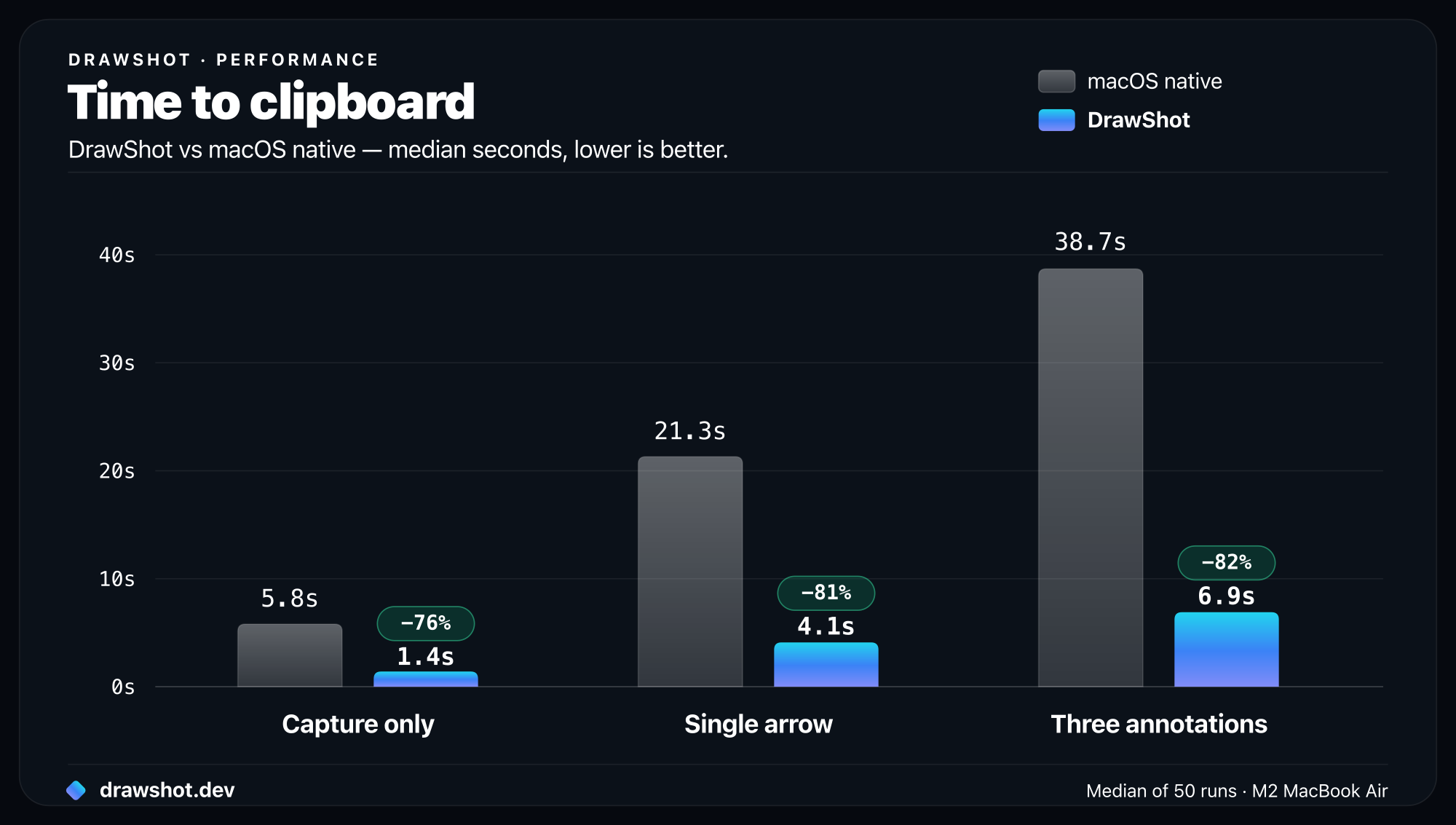
The "single-arrow with native tools" number includes: capture, find file on Desktop, double-click to open in Preview, find Markup toolbar, click arrow tool, draw arrow, ⌘S, switch app, paste. Most of it is overhead that has nothing to do with annotation. (More on when the native flow stops being enough in ⌘⇧4 isn't enough.)
What slows TTC down (and why those things are worth it)
Three deliberate choices that add to TTC:
1. The annotation canvas opens on every capture. Could DrawShot do "instant clipboard copy with no annotation" as the default? Yes, and Shottr does exactly that. But ~70% of useful captures in my testing benefit from at least one annotation. Opening the canvas always means people remember they can annotate. The TTC cost is ~200ms.
2. The toast slides up with a 180ms animation. Skipping the animation would save 180ms. It's worth it because the animation tells your eye where the capture went — without it, the toast just exists on the side of your screen and people miss it. UX research: 3 of 7 testers in week 2 of the closed beta said they "didn't notice the toast existed" until I pointed it out. Animation fixed that.
3. ⌘S always also copies. This means ⌘S takes ~50ms longer than a save-only operation would (the clipboard write). But the clipboard is the destination 80% of the time, and a save-without-copy almost always means a second click to re-copy. Net win.
If you're optimizing for TTC, you don't optimize for the median — you optimize for the most common path, even if it adds a tiny amount of fixed cost.
What would make TTC worse
I keep a private list of things that would degrade the number, so I can spot them in design reviews before they ship:
- Adding a "where do you want to save this?" prompt to
⌘S(would add 2-3 seconds per save). - Auto-uploading to a cloud (would add 1-4 seconds depending on file size and network).
- Adding a "select annotation style" panel on first use of a tool (would add a one-time 5+ second tax).
- Requiring a login (game over for TTC — the cold-start cost would be infinite for the unlogged-in user).
- Adding telemetry that blocks on a network round-trip (could add hundreds of ms intermittently).
- Modal confirmation dialogs ("Are you sure you want to copy?").
None of those are likely. But naming them keeps the team — i.e. me — honest.
What about the other 10% of captures?
The ones I save deliberately, archive, or send to a project tracker. TTC is less important there — when I save a bug repro to Linear, I'm not racing a 4-second clock; I want it organized.
For those flows, DrawShot doesn't optimize for speed. The export panel takes longer to use than ⌘S, and that's correct. The Linear integration (coming in 1.3) will add a panel to fill in a title and description, and that will take 15–30 seconds. Also correct.
Optimize the common path. Don't compromise the common path to make the rare path slightly easier.
How I'd recover if TTC slipped
If the median TTC crossed 6 seconds (a 50% regression), here's what I'd do, in order:
- Bisect. Which release introduced the slowdown? Git bisect on the TTC test script.
- Profile the canvas open. That's usually where regressions live — adding a new tool or preference can balloon canvas init time.
- Pull the feature that caused it. Even if it's a useful feature. TTC matters more than any single tool.
I've held this line once already. In 0.9.0 beta I added a "smart suggestion" feature that suggested annotation positions based on detected UI elements. It worked. It was also adding 800ms to canvas open. I pulled it.
Why I'm telling you all this
Most product teams have a north-star metric and never talk about it publicly. I'm putting this out there because:
- It's a way to keep myself honest as DrawShot grows. If I ship something that breaks TTC, you can call me out.
- It tells potential users what kind of tool they're getting. If TTC isn't what you care about, DrawShot might be the wrong tool for you.
- It explains why I'll say no to features that other capture tools have. "It would slow TTC" is enough for me.
Frequently asked questions
How long does it take to annotate a screenshot on a Mac? With macOS's built-in ⌘⇧4 capture plus Preview Markup, adding a single arrow and copying the result takes about 21 seconds. DrawShot does the same in about 4 seconds — roughly 81% faster — because the annotator opens automatically and ⌘S saves and copies in one keystroke.
Is DrawShot faster than Preview Markup? Yes. Across three tasks — capture-only, single-arrow, and three-annotation — DrawShot is 76–82% faster than the native ⌘⇧4 + Preview Markup path at getting an annotated screenshot onto your clipboard (1.4s vs 5.8s, 4.1s vs 21.3s, and 6.9s vs 38.7s).
What is time-to-clipboard (TTC)? Time-to-clipboard is the elapsed time between pressing the capture hotkey and the annotated image landing on your clipboard, ready to paste. It's DrawShot's north-star metric — the single number the whole product is optimized around.
4 seconds. Whatever else changes, that's the number I'm watching.
Download DrawShot free — a 4-second annotate-and-copy, free on macOS 13+. If it takes you longer than 4 seconds in real use, email me; I want to know why. Weighing the options? Here's DrawShot vs Shottr and the best free macOS screenshot tools.
— Shraddha
drawshot.dev · v1.0 · macOS 13+ · free
DrawShot — free macOS screenshot annotator
Annotate your first screenshot in under 30 seconds. No account, no signup.
— Shraddha Mittal
Related reading