engineering · native-mac · solo-build
Building a native macOS app in 8 weeks, solo
I built DrawShot — a 12,000-line native macOS screenshot app in Swift, SwiftUI, and AppKit — solo in 8 weeks, March 14 to May 14. Here's the week-by-week build log: the capture pipeline, the region picker, a SwiftUI-to-AppKit rewrite, the toast stack, and the three days an Intel-only crash almost made me quit.
DrawShot is built in Swift with SwiftUI for the UI shell and AppKit for the annotation canvas. It's a 12,000-line codebase. I started March 14 and shipped 1.0 on May 14.
This post is the memoir version of those 8 weeks — what I picked up, what I'd skip if I did it again, and the three days I almost gave up.
I'm a designer who can code, not a software engineer who's been doing this for a decade. So treat the lessons as "what worked for one person" rather than "best practice."
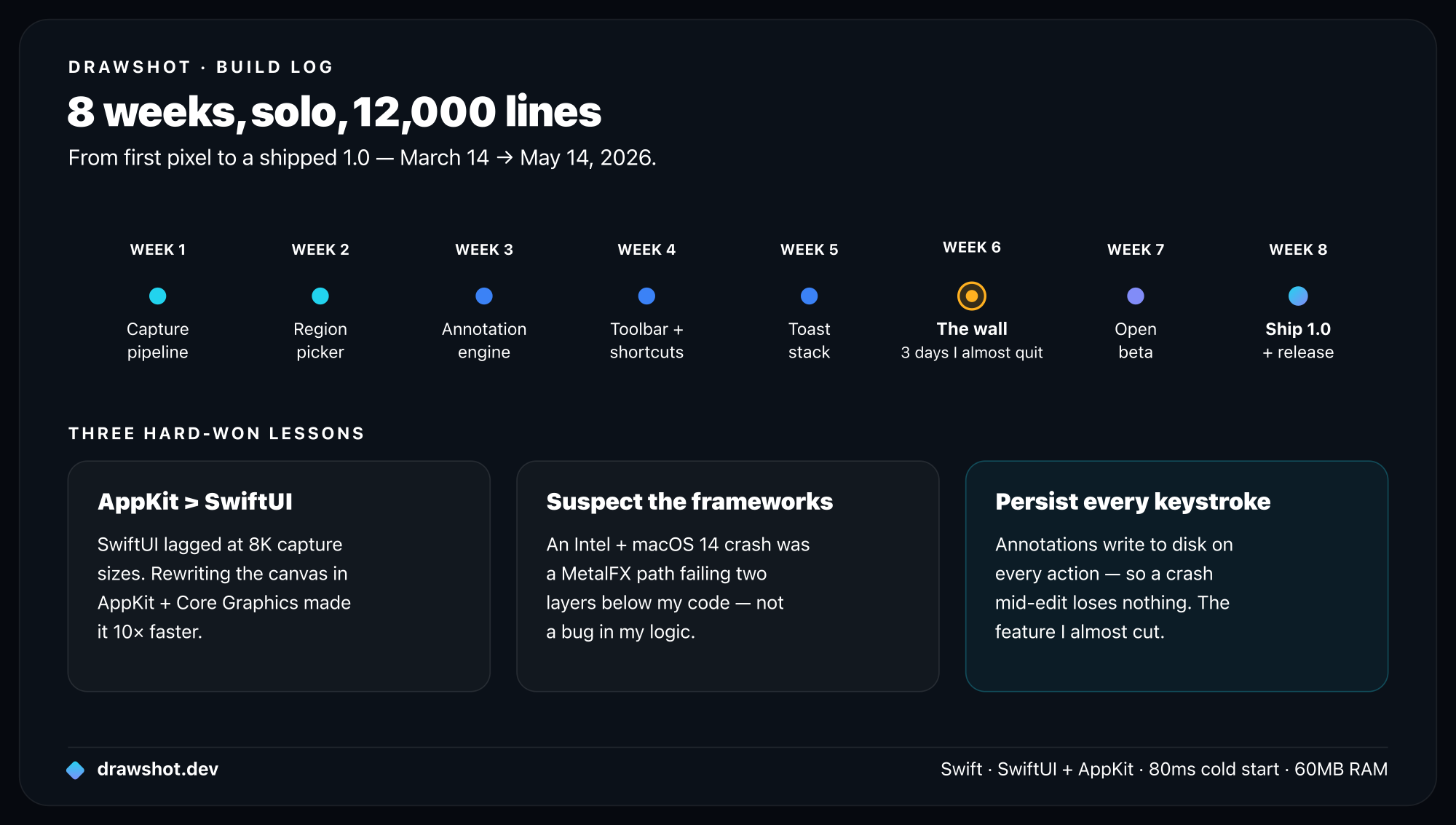
Week 1 — Capture pipeline
The first thing I built was the boring core: CGWindowListCreateImage to read pixels under a rectangle, write to NSPasteboard. About 80 lines of code, took two days.
The hard part wasn't the API. It was the permissions dance. macOS requires Screen Recording access via CGRequestScreenCaptureAccess(), and the first time the app calls a screen-reading API, the user gets a system prompt. After that, the app needs to be quit and relaunched before the permission actually takes effect.
That relaunch step is documented exactly nowhere in Apple's official guides. I spent a day thinking my code was broken before I found a 2021 forum post that explained it.
Lesson: Apple's official docs cover the API. The actual workflow nuances live on Stack Overflow and obscure forums. Budget time for that.
Week 2 — Region picker
The region picker — that dimmed overlay with crosshair cursor and a draggable rectangle — was way harder than it looked.
What you might guess it needs:
- A fullscreen
NSWindow - A click-and-drag handler
What it actually needs:
- A fullscreen
NSWindowper display (multi-monitor) - A
CAShapeLayerfor the rectangle (Core Animation, not AppKit, for fast redraws) - A custom
NSCursorfor the crosshair (and you have to load it from a 1x and a 2x asset) - Keyboard event monitoring so
Esccan cancel - Coordinate translation between screen space, window space, and image space (macOS has Y-flipped coordinates compared to image data — every off-by-one bug I had in week 2 was a Y-flip)
- A magnifier loupe that follows the cursor (lifted directly from native macOS — without it, picking pixel-perfect regions is impossible on a Retina display)
Week 2 was ~1,800 lines. Of those, ~600 were the magnifier loupe.
Week 3 — Annotation engine, attempt one
I started with SwiftUI for the canvas. Built arrows, rectangles, text — all in SwiftUI. By day 3 the canvas was lagging at 8K capture sizes.
SwiftUI is great for forms and lists. It's a poor fit for a canvas with 50+ persistent shape layers that need to redraw at 120Hz when you drag one. The rendering model isn't built for it.
By Wednesday of week 3 I had a working SwiftUI canvas that was unusably slow at high-res. By Friday I'd rewritten the whole thing in AppKit + Core Graphics, using CALayers for each annotation. The new version was ~10x faster.
Lesson: When SwiftUI struggles, AppKit is right there and it's fine. The two coexist in the same app without drama. Don't be precious about which framework you started with.
Week 4 — The annotation toolbar
The annotation toolbar — the floating row of tool icons at the bottom of the canvas — should have taken a day. It took five.
The issue: I wanted single-key shortcuts (A for arrow, R for rectangle, etc.) to work only when the canvas was focused, not when a text field inside the canvas was focused (because then the user is typing a caption and A should type the letter A, not switch to the arrow tool).
The solution involves intercepting NSEvent at the right layer in the responder chain, with a check for whether the first responder is a text field. This is the kind of thing that's two lines of code once you know it and four days of trial-and-error if you don't.
There's a hard-won pattern in there that I might write up as a standalone post.
Week 5 — Toast stack
Two design decisions that turned out to be the right ones:
The annotation canvas is a viewer over the toast, not the source of truth. Closing the canvas doesn't destroy anything. The data lives in ~/Library/Application Support/DrawShot/sessions/<timestamp>/annotations.json.
Every annotation action writes to disk immediately. Not "on save." Not "on app quit." Every keystroke. The file watcher pattern (DispatchSourceFileSystemObject) lets the toast stack and canvas stay in sync without explicit messaging.
The cost is some I/O on each annotation — a few KB per keystroke. The benefit is that a crash mid-edit loses nothing.
I almost cut this for time. I'm glad I didn't. It's the feature that distinguishes DrawShot from a hundred other capture tools — I wrote up the toast-stack design separately.
Week 6 — The three days I almost gave up
Week 6 was supposed to be polish. It became a brick wall.
The issue: on Intel Macs running macOS 14, DrawShot would crash on the second capture, every time. Not on M-series. Not on macOS 13. Only the Intel + 14 combination.
I spent three days reproducing it, reading kernel panic reports, and being unable to figure out what the difference was. Nothing in the code path was conditional on architecture.
Day 4, on a hunch, I disabled the MetalFX upscaling I was using for the magnifier loupe. The crash went away. Turned out a Metal framework path was non-deterministically failing on Intel + 14, and the failure cascaded into a memory issue elsewhere. I had no way to fix the framework; I switched the magnifier to use a plain bicubic upscale.
Lesson: When a bug repros on one platform variant only, the problem is usually two layers below where it's visible. Don't keep reading your own code; suspect the frameworks first.
(Aside: this is the kind of thing that makes me sympathetic to "just ship on the web" arguments. But the tradeoff for native is real — DrawShot opens in 80ms and uses 60MB of RAM. An Electron equivalent would be 800ms and 600MB.)
Week 7 — Beta and the things I cut
Open beta with 31 people. Half a dozen useful bug reports, two of them critical.
The harder feedback was the asks that didn't fit the product:
- "Can I sync my toast stack across Macs?"
- "Can I share captures with my team via a link?"
- "Can DrawShot detect what app I'm capturing and auto-tag it?"
Every one of those is a reasonable ask. Every one of them is a different product. Saying no to people who gave me their time was harder than I expected — the local-only, no-cloud stance is what made the no principled. I wrote a "not on the roadmap" section in the public docs to make the no concrete (see docs/roadmap.md).
Week 8 — Release prep
Most of week 8 was the unglamorous stuff:
- Code signing certificate (Apple Developer Program: $99/year).
- Notarization (40 minutes per build, mostly automated).
- DMG layout (more time than I want to admit positioning the Applications symlink).
- The website (Next.js, deployed to Railway — about a day).
- The download page with checksums.
- Writing the docs you're reading.
If I were to do this again, I'd start the release-prep work in week 4, not week 8. Notarization in particular has a learning curve, and you don't want to be debugging it 24 hours before launch.
Things I'd skip next time
- The custom magnifier loupe in week 2. macOS has a built-in screen magnifier in Universal Access. Borrowing the system one would have saved 600 lines.
- The initial SwiftUI annotation engine. Should have gone AppKit from day one. Three days wasted on the rewrite.
- The "smart suggestion" prototype in week 5. Cut it after testing showed users hated it. Two days of work that never shipped.
- Custom build of
swift-bundler. Would have been faster to use Xcode's default release configuration with a small script.
That's about 8 days of work that didn't make it into the shipped product. In an 8-week project, that's 14% slippage. Not bad, not great.
What I'm doing differently for 1.1
A few things changed in my workflow over the build that I'm keeping:
- TTC test script runs on every commit (locally, no CI yet). If the median TTC crosses a threshold, the commit is suspect.
- Snapshot tests for the annotation canvas. Render 12 reference captures, compare pixel-by-pixel. Caught a bug in 1.0.0-rc3 where dashed lines were drawing one pixel off.
- A weekly review of the public roadmap. Reasons to remove items, not just add them.
Frequently asked questions
How long does it take to build a native macOS app? DrawShot — a 12,000-line native macOS screenshot annotator in Swift, SwiftUI, and AppKit — took one designer-who-codes eight weeks solo, first capture to shipped 1.0. The biggest time sinks: the region picker, an annotation-engine rewrite from SwiftUI to AppKit, and a platform-specific crash on Intel Macs.
Should I use SwiftUI or AppKit for a macOS app? SwiftUI for forms and lists, AppKit for a high-performance canvas. DrawShot's canvas started in SwiftUI and lagged at 8K capture sizes; rewriting it in AppKit + Core Graphics with a CALayer per annotation was ~10× faster. The two coexist fine in one app.
Native macOS app or Electron? Native, if startup and memory matter. DrawShot opens in ~80ms and uses ~60MB of RAM; an Electron equivalent would be closer to 800ms and 600MB. The cost is platform-specific bugs — a MetalFX crash on Intel + macOS 14 cost three days — but the performance gap is real.
DrawShot 1.0 is live. If you're a solo dev building a native Mac app, my email is drawshot.dev/contact — I'm happy to swap notes.
Download DrawShot — free — macOS 13+, no account.
— Shraddha
drawshot.dev · v1.0 · macOS 13+ · free
DrawShot — free macOS screenshot annotator
Annotate your first screenshot in under 30 seconds. No account, no signup.
— Shraddha Mittal
Related reading