comparison · shottr
DrawShot vs Shottr — an honest comparison
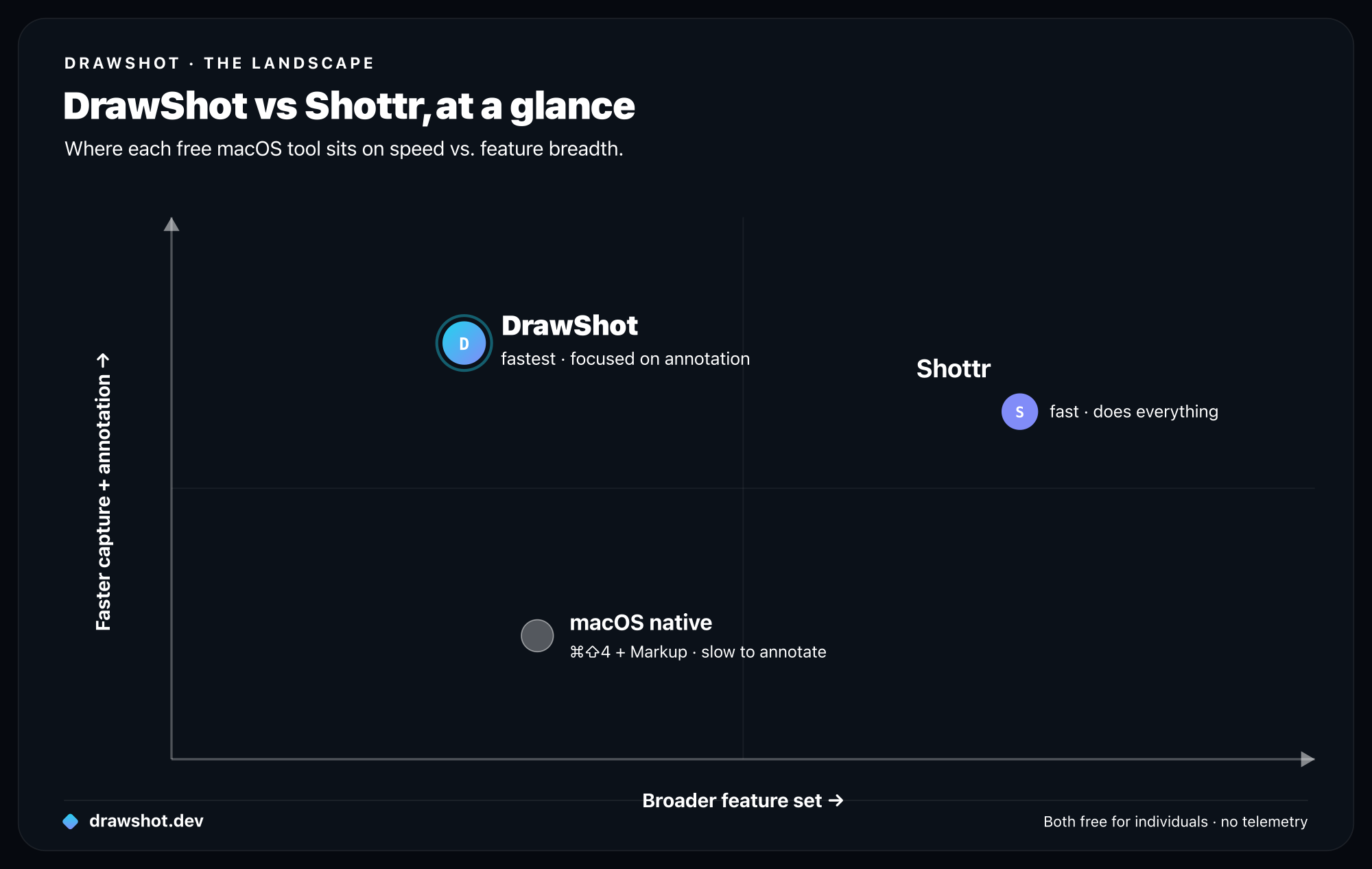
DrawShot and Shottr are both fast, free macOS capture tools. Pick DrawShot for the fastest keyboard-first annotation — single-key tools, a crash-proof toast stack, and a 4.1s single-arrow time-to-clipboard. Pick Shottr for breadth — scrolling capture, OCR, color picker, and pixel tools today, plus macOS 11+ support.
Shottr is the most direct comparison to DrawShot. Both are macOS-native, both are free for individuals, both prioritize speed — and both make my best free macOS screenshot tools list. If you're choosing between them, here's the honest breakdown.
Short version: if you want a Swiss-army-knife capture tool with OCR, scrolling capture, and color picker all baked in today, pick Shottr. If you want the fastest annotation workflow with the cleanest tool surface and a toast stack that won't lose work, pick DrawShot.
Where Shottr is the better choice
Shottr already ships scrolling capture, OCR, and color picker. All three are on DrawShot's roadmap (1.1 and 1.2), but not in 1.0. If you need any of these today, Shottr wins.
Smaller install size. Shottr is around 9MB; DrawShot is around 18MB (universal binary with bundled MetalFX assets). On a modern Mac it doesn't matter, but if you care, Shottr is leaner.
Older macOS support. Shottr runs on macOS 11+. DrawShot needs macOS 13+. If you're on an older Mac that can't update, Shottr is your tool.
"Pixel-perfect" capture tools. Shottr has dedicated tools for measuring dimensions, sampling colors at exact pixels, and inspecting interface details. These are great for designers doing front-end QA work. DrawShot doesn't have equivalents and isn't planning to.
Lifetime $8 Pro tier. Shottr Pro is a one-time $8 purchase for the advanced features (auto-capture intervals, extended history, etc.). Very low cost, very fair.
Active for longer. Shottr has been around since 2021 and has had time to accumulate niche features that one-week-old apps don't have.
Where DrawShot is the better choice
Single-key annotation workflow. DrawShot's annotation tools are each bound to a single key — A for arrow, R for rectangle, etc. Shottr uses tool-picker clicks or modifier chords. For people who annotate heavily, the keyboard-only workflow saves real time.
Toast stack with disk persistence. DrawShot's toast stack persists every annotation to disk, every keystroke. If the app crashes, your work survives. Shottr has a capture history but the in-progress annotation state isn't preserved across crashes the same way.
Annotation canvas size and clarity. DrawShot's canvas is full-screen-ish; annotations get plenty of room. Shottr's annotation panel is more compact, which is faster for some, more cramped for others. Try both.
Tighter focus. DrawShot is "region capture + annotation + clipboard, optimized." Shottr is "region + window + scrolling + OCR + color + measurement + delayed capture + recording" — a broader set of features. If you only ever needed annotation speed, the focused tool gets out of your way faster.
Faster annotation TTC for the common case. On the single-arrow benchmark, DrawShot lands at 4.1s median; Shottr lands around 4.8s on the same hardware. The difference is small but real and consistent. Both are dramatically faster than macOS native (~21s).
Direct feature comparison
| DrawShot 1.0 | Shottr | |
|---|---|---|
| Region capture | ✓ | ✓ |
| Window capture | Coming 1.1 | ✓ |
| Scrolling capture | Coming 1.2 | ✓ |
| OCR | Coming 1.1 | ✓ |
| Color picker | Not planned | ✓ |
| Pixel measurement tool | Not planned | ✓ |
| Single-key annotation shortcuts | ✓ | Partial |
| Persistent toast stack | ✓ | ✓ (different UX) |
| Disk persistence per keystroke | ✓ | No |
| Telemetry | None | None |
| OS support | macOS 13+ | macOS 11+ |
| Free tier limits | Fully featured | Fully featured |
| Pro tier | Coming soon ($9/year) | $8 lifetime |
| Source | Closed | Closed |
Why two free tools
Worth saying outright: I respect Shottr a lot. The developer (Mikhail) has been thoughtful about scope, fast, and resisted the SaaS-ification creep that hits a lot of capture tools.
DrawShot exists not because Shottr is wrong, but because I wanted a slightly different shape:
- Shottr aims to be "the swiss army knife" — many tools, all good, all in one app.
- DrawShot aims to be "the fastest annotation pipeline" — fewer tools, hyper-optimized for the common case.
Both shapes are valid. The right one for you depends on whether your bottleneck is "I need more capture features" (Shottr) or "I want my existing workflow to be faster" (DrawShot).
TTC comparison
Same M2 Air, same 50-run test (see the full time-to-clipboard methodology):
| DrawShot | Shottr | |
|---|---|---|
| Capture-only | 1.4s | 1.6s |
| Single arrow | 4.1s | 4.8s |
| Three annotations | 6.9s | 7.5s |
The annotation gap is partly because DrawShot's single-key shortcuts cut the "select tool" phase. Shottr's tool-picker is fast but adds a click per tool switch.
What I'd watch over time
A real question for both tools is scope discipline. Capture tools that start small often expand into things they shouldn't be: a video tool, a screen recorder, a team collaboration platform. Both Shottr and DrawShot have so far resisted this.
If either tool starts shipping "AI annotation suggestions," "team libraries," or "cloud sync," that's a sign the focus has slipped. I'm aware of the temptation; I've said no to it for DrawShot. Mikhail seems to have similar discipline with Shottr.
Which to pick
Pick Shottr if:
- You need OCR, scrolling capture, or color picker today.
- You're on macOS 11 or 12.
- You want pixel-measurement tools for design QA work.
- You like having all your capture capabilities in one app.
Pick DrawShot if:
- You annotate captures heavily and want single-key shortcuts.
- You've lost annotation work mid-edit before and want disk-persisted toast stack.
- You're on macOS 13 or newer.
- You'd rather have a small, sharp tool than a broad one.
Use both: they coexist fine. Different default hotkeys (Shottr uses ⌘⇧⌥1, DrawShot uses ⌘⇧4), so no conflict.
Frequently asked questions
Is DrawShot or Shottr better? It depends on your bottleneck. DrawShot is faster for heavy annotation — single-key tools, disk-persisted work, and a 4.1s single-arrow TTC. Shottr is the broader utility, with scrolling capture, OCR, color picker, and pixel tools today, plus macOS 11+ support. Both are free for individuals.
Is Shottr free? Yes. Shottr is fully featured and free for individuals; a one-time $8 lifetime Pro unlocks advanced extras. DrawShot is also free, with a Pro tier coming soon ($9/year).
What's a good free Shottr alternative for fast annotation? DrawShot. It focuses on a fast, keyboard-first annotation pipeline — every tool is a single key and work is saved to disk per keystroke — landing a single-arrow annotation on the clipboard in about 4.1 seconds.
Download DrawShot free — macOS 13+, no account. Or grab Shottr — both are worth a try.
— Shraddha
drawshot.dev · v1.0 · macOS 13+ · free
DrawShot — free macOS screenshot annotator
Annotate your first screenshot in under 30 seconds. No account, no signup.
— Shraddha Mittal
Related reading