comparison · listicle · free-tools
Best free macOS screenshot tools in 2026
The best free macOS screenshot tools in 2026 are DrawShot for fast keyboard-first annotation, Shottr for an all-around utility belt, and the built-in ⌘⇧4 for occasional use — with Xnapper, Kap, and Skitch covering niche jobs like beautifying, GIFs, and legacy workflows.
I'll be upfront: I build one of the tools on this list (DrawShot). I've tried to write this fairly anyway, because the alternative — pretending DrawShot doesn't exist — would be silly, and pretending it's the best at everything would be dishonest.
Here are the free macOS screenshot tools I'd actually recommend in 2026, ranked by what they're best at.
Quick comparison
| Tool | Best for | Free tier | Pro / paid |
|---|---|---|---|
| DrawShot | Fast annotation workflow | Fully featured | Pro coming soon ($9/year) |
| Shottr | All-around utility belt | Fully featured for individuals | $8 lifetime Pro |
| Native macOS (⌘⇧4) | Zero-install, sometimes enough | Built into macOS | – |
| Xnapper | Beautifying screenshots for social | Limited free trial | $25 one-time |
| Kap | Quick GIF / video clips | Free, open source | – |
| Skitch | Legacy users, simple needs | Free (unmaintained) | – |
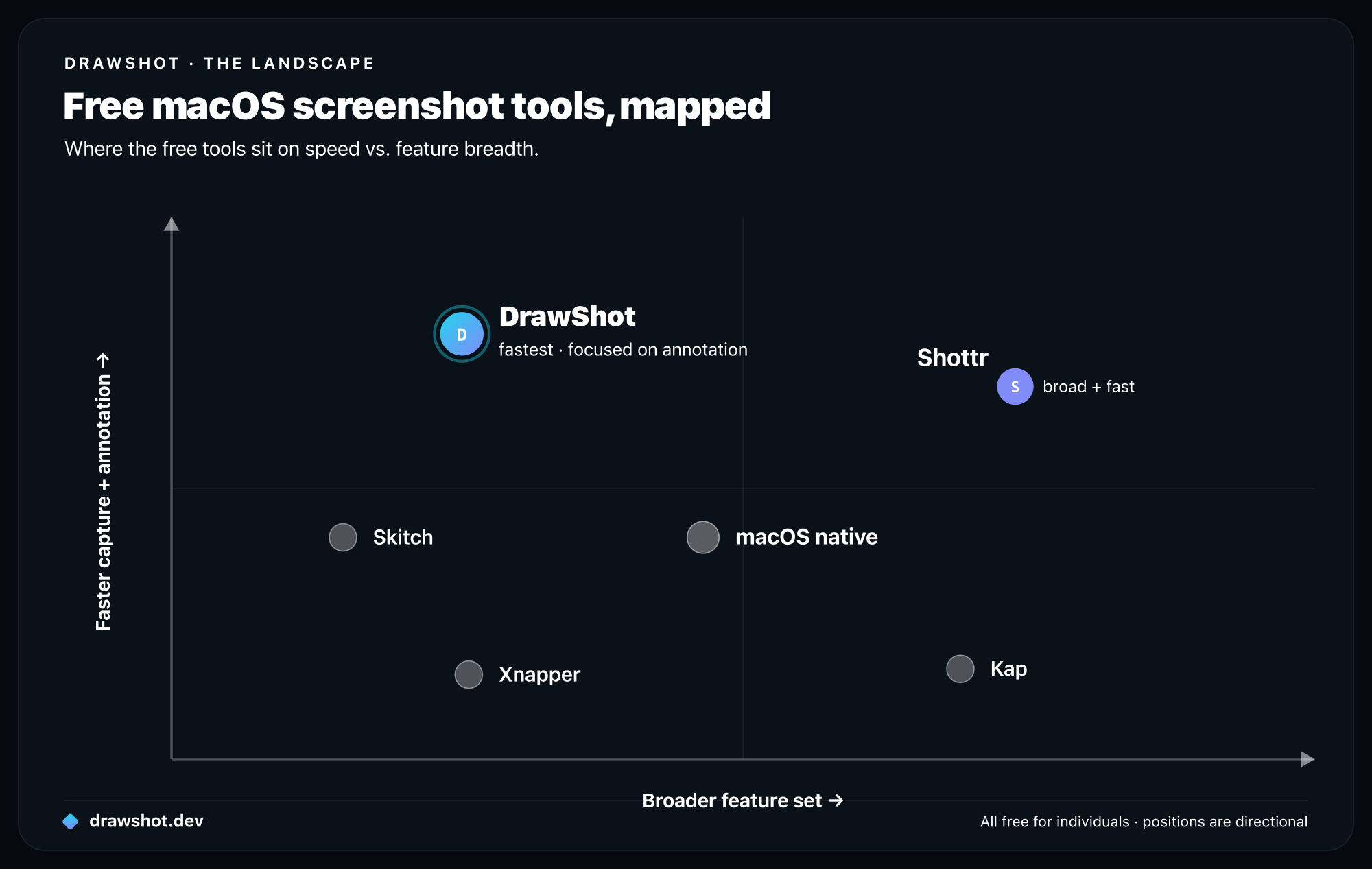
1. DrawShot — for fast, keyboard-first annotation
I built this, so take with a grain of salt.
DrawShot is built around one number: time-to-clipboard. Capture is ⌘⇧4, annotate with single-key tools (A for arrow, R for rectangle, etc.), copy with ⌘S. Median 4 seconds from capture to clipboard with one annotation.
Strengths:
- Single-key annotation shortcuts for all 11 tools
- Toast stack persists every keystroke to disk — work survives crashes
- No telemetry, no account, no cloud
- Free, fully featured; no paywall on basic capture/annotation
Limitations:
- No video / GIF / scrolling capture (scrolling coming in 1.2)
- macOS 13+ only
- No cloud sharing on the free tier (basic Share via iCloud links are coming on Pro); no team libraries
Pick it if: you take 20+ captures a day and annotate most of them.
2. Shottr — for the all-arounder
Shottr is the broadest free capture tool that's also fast. It has region, window, scrolling capture, OCR, color picker, and a measurement tool — and it doesn't gate any of them behind a paywall for individual use.
Strengths:
- Scrolling capture is best-in-class for free tools
- Built-in OCR works on most screenshots
- Has a pixel-measurement tool useful for design QA
- $8 Pro one-time for extra features; no subscription
Limitations:
- Annotation workflow is fast but not single-key-per-tool
- The breadth means there's more to discover (good or bad, depending on you)
Pick it if: you want one tool for everything and don't want a SaaS attached. (See the full DrawShot vs Shottr breakdown.)
3. Native macOS (⌘⇧4 / ⌘⇧5) — for when "good enough" is enough
It's worth saying: macOS native screenshot has gotten substantially better over the years. ⌘⇧4 for region, ⌘⇧5 for the picker UI, with built-in basic markup (lines, shapes, text, signatures).
Strengths:
- Already installed
- macOS 14+ has built-in OCR (
⌘⇧4, then right-click the floating thumbnail) - Zero learning curve
- Works the same on every Mac
Limitations:
- Saves to Desktop by default — clutters fast
- Annotation in Preview / Markup is functional but feels like a 2011 product
- No persistent toast stack, no session preservation
- TTC for an annotated screenshot is ~20+ seconds
Pick it if: you take 1–5 captures a day and don't want a third-party app. For why the native flow stalls once you annotate, see ⌘⇧4 isn't enough.
4. Xnapper — for marketing / social screenshots
Xnapper is the "beautify this screenshot" tool. Adds gradient backgrounds, balanced padding, fake browser frames, drop shadows. The output looks like marketing material, not a raw capture.
Strengths:
- Output is visually polished by default
- Browser-frame and device-frame mockups for landing-page screenshots
- Good for product launches, App Store screenshots, social posts
Limitations:
- Trial-only free tier (~7 days)
- $25 one-time after that
- Not designed for in-flight annotation workflow
Pick it if: you make a lot of "hero" screenshots for marketing.
5. Kap — for GIF and video clips
Open-source screen recorder. Captures a region as video, exports to GIF, MP4, or WebM. Doesn't do still screenshots.
Strengths:
- Free, MIT-licensed, open-source
- Lightweight GIF export
- Good plugin ecosystem
Limitations:
- No still-image capture
- Annotation is minimal
- Development has slowed in recent years
Pick it if: you need short screen clips for bug reports.
6. Skitch — for legacy users only
Skitch was Evernote's free annotation tool. It still works on modern macOS but hasn't received a meaningful update in years.
Strengths:
- Free
- Familiar to longtime Evernote users
- Simple annotation toolbar
Limitations:
- No active development
- Crashes on some macOS versions
- Annotation feels dated
Pick it if: you've been using Skitch for a decade and your muscle memory is locked in. Otherwise, anything else on this list is a better pick. If you're actively looking for a Skitch replacement, see the best Skitch alternatives for Mac.
What to look for in a free capture tool
A practical checklist if you're evaluating new tools:
- Does it open the annotation canvas instantly? (Should be <300ms on M-series.)
- Does
⌘Sactually put an image in the clipboard? Test this. Some tools save first and require an extra step. - Does it survive an app switch? Capture, switch to Slack, switch back. Annotation should still be there.
- Does it phone home? Open Little Snitch (or
lsof -iin Terminal) while taking captures. See what connects out. - Does the free tier do what you actually need? Some "free" tools lock essential features behind upgrades.
What I wouldn't recommend (and why)
A few tools I'd steer clear of for general use:
Lightshot. Cross-platform but the macOS version is dated, and the cloud upload defaults are aggressive.
Greenshot. Windows-first; the macOS port hasn't kept up.
Monosnap. Was great in 2015. Has become increasingly cloud-pushy over the years. Free tier is heavily limited.
Built-in Notion / Slack capture. Good for "paste from clipboard," not for capture itself. Use a real capture tool, paste into Notion / Slack.
Related comparisons
This post covers free tools. If you're evaluating paid options or switching from a specific app, these go deeper:
- CleanShot X alternative for Mac — when you want lighter and cheaper
- Skitch alternative for Mac — modern replacements for the Skitch workflow
- Snagit alternative for Mac — when Snagit's price doesn't match your use case
- Best paid screenshot tools for Mac (2026) — full roundup including paid options
Frequently asked questions
What is the best free screenshot tool for Mac? For fast keyboard-first annotation, DrawShot; for an all-around utility with scrolling capture and OCR, Shottr; for occasional use with zero install, the built-in ⌘⇧4. All three are free and need no account.
Does macOS have a built-in screenshot tool? Yes. Press ⌘⇧4 for a region capture or ⌘⇧5 for the picker UI, with basic Markup built in; macOS 14+ adds OCR. It's free and zero-install, but annotating a screenshot through Preview takes about 20 seconds.
What's the best free tool for screen recording or GIFs on Mac? Kap, an open-source recorder, exports a region to GIF, MP4, or WebM. macOS ⌘⇧5 also does basic screen recording. Neither is built for still-image annotation — pair them with a capture tool like DrawShot or Shottr.
Honest disclaimer
I build DrawShot. I'm biased. The most honest thing I can tell you is:
- If "fast annotation" is your bottleneck → DrawShot.
- If "broad feature set with no SaaS" is your bottleneck → Shottr.
- If "I take 3 screenshots a year" → native macOS is fine.
- If "I'd rather pay for extra polish" → here's DrawShot vs the paid alternative.
You can install more than one. They cohabit fine.
Download DrawShot free — free, no account, macOS 13+. If fast annotation is your bottleneck, it's a ~4-second capture-to-clipboard.
— Shraddha
drawshot.dev · v1.0 · macOS 13+ · free
DrawShot is free to download — no account, no signup. Pro adds AI features and OCR for $9/year, less than a coffee a month.
Free core tools · no account required · Apple Silicon native
— Shraddha Mittal
Related reading