use-case · developers
For developers: faster bug reports with DrawShot
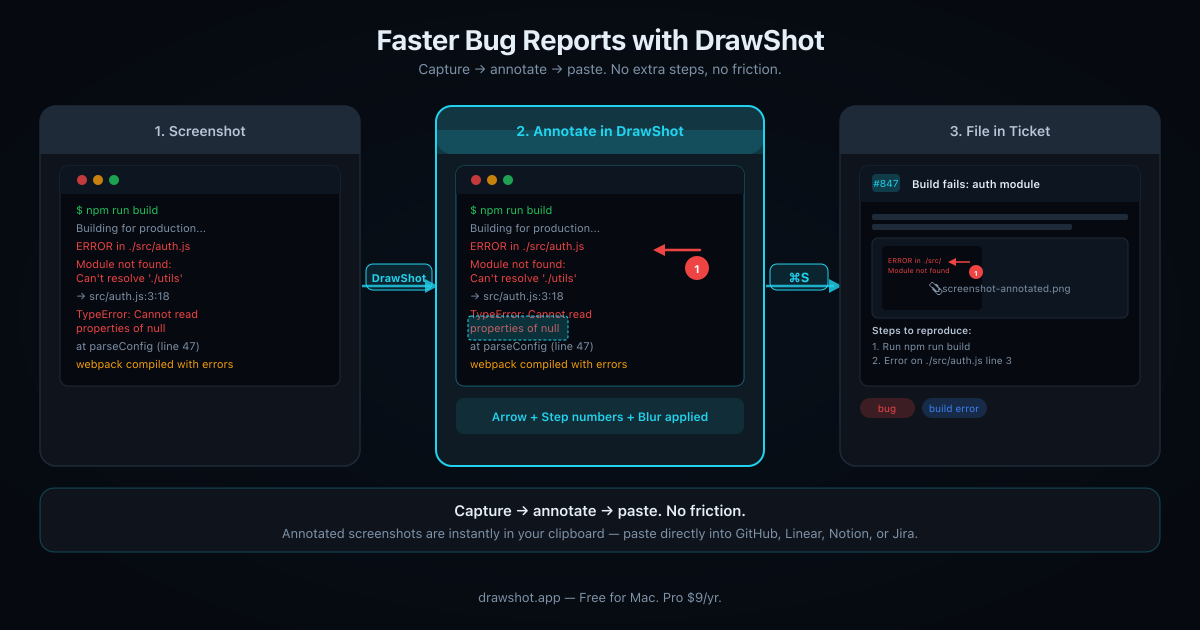
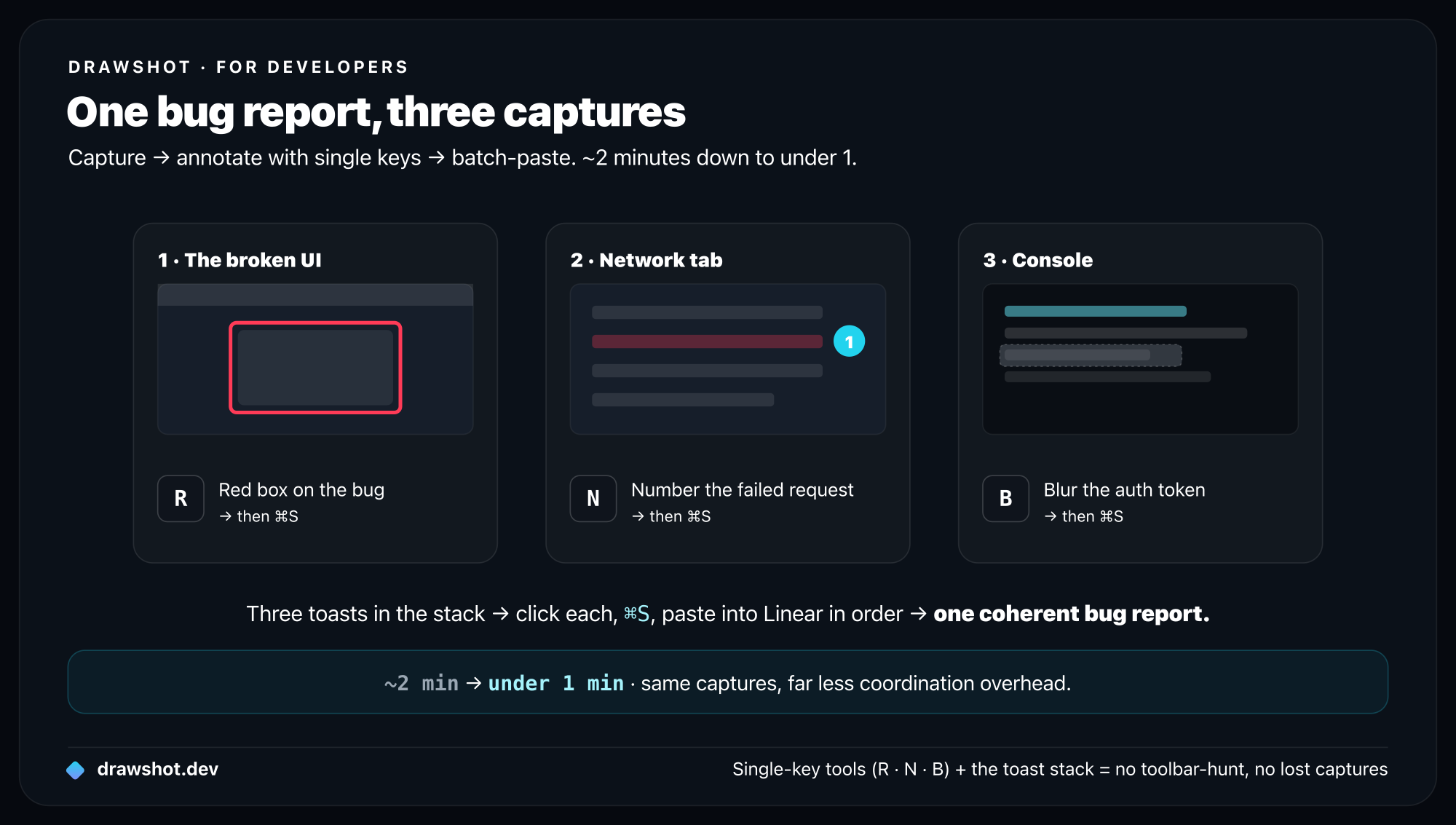
A bug repro is usually ~90 seconds of capturing, annotating, and pasting that has nothing to do with the bug. With DrawShot you cut it to ~15: capture the UI, network, and console; annotate with single keys (R for a red box, N for a step number, B to blur); and batch-paste from the toast stack into Linear.
If you work on a software team, you file bug reports. If you file bug reports, you take screenshots. If you take screenshots, you know the depressing math: a single bug repro is maybe 90 seconds of "captures + annotations + paste into Linear" that has nothing to do with actually finding or fixing the bug.
This post is about cutting that to ~15 seconds with DrawShot, plus a few patterns I picked up from three developers I interviewed about their workflow.
The typical bug repro today
What I see most developers do, with native macOS or basic capture tools:
⌘⇧4, capture the broken UI.- Open in Preview, draw a red box around the broken element. (~10s)
- Save to Desktop, drag the file into Linear. (~5s)
- Repeat for the network tab. (~30s)
- Repeat for the console error. (~30s)
- Switch back to Linear, write the description, attach screenshots in order, link them in the body. (~30s)
Total: ~2 minutes per bug. If you file 5 bugs a day, that's 10 minutes of pure overhead per day, or about 40 hours a year. Most of which isn't engineering.
The screenshots themselves are a small part. The friction is the coordination — making sure all three captures end up in the issue, in the right order, with the right annotations, without leaving 12 PNGs on your Desktop afterwards.
The pattern that compresses it
What the developers I talked to converged on, regardless of tool:
One issue = a stack of related captures with consistent annotation styles, batch-captured, batch-pasted.
DrawShot's toast stack is built for this. Here's the workflow:
⌘⇧4— capture the broken UI.R→ drag a red rectangle around the broken element.⌘S.⌘⇧4— capture the network tab error. (Toast 2 appears next to toast 1.)N→ drop a step number on the failed request.⌘S.⌘⇧4— capture the console stack trace. (Toast 3.)B→ blur the auth token.⌘S.- Switch to Linear, open new issue.
- Click toast 1 →
⌘S, paste into Linear. Repeat for toast 2 and 3. - Write the title and description.
Total: ~25 seconds for the captures, ~30 for the writing. Down from 2 minutes to under a minute.
The two things that compress it:
- Single-key annotation (
R,N,B) means no toolbar-hunting between captures. - The toast stack keeps all three captures visible so you don't lose any.
Patterns that compound
Things developers I talked to do that I started doing too:
1. Use red rectangles for "the broken thing"
Adopt one annotation style for "this is the bug" and use it consistently. Click the Red swatch plus the rectangle tool (R). Every bug repro you file has the same visual signal.
Why it matters: the engineer who reads the issue knows what to look at without reading the description. Half of bug-report friction is the engineer not understanding what part of the screenshot matters.
2. Use step numbers for sequence
For "do this, then this, then this" repros, drop step numbers (N) on each interaction point in a single capture. One image, four numbered clicks, way easier to follow than four separate screenshots with text descriptions.
The numbered circles auto-increment as you drop them — no manual numbering.
3. Blur generously
Blur tool (B) over: auth tokens in URLs, email addresses in customer screenshots, account IDs, anything that would make your Slack channel reach for the "delete this please" button.
For higher-stakes redaction, Export → "Flatten with redaction" replaces blurred pixels with solid black. The original pixels never make it into the file.
4. Triple-capture network errors
For API bugs, the three captures that go together:
- The UI showing the bad behavior (rectangle around the broken element)
- The Network tab showing the failed request (step number on the request, rectangle around the response)
- The Console showing the error stack (highlight over the error line)
Three captures, three toasts in the stack, paste in order. One coherent bug report.
5. Capture more than feels necessary, dismiss what you don't need
Disk space is cheap. Capture more screenshots while debugging than you think you'll need. The toast stack holds them; if you don't end up using one, click ✕ dismisses it. The cost of an extra capture is nothing; the cost of going back to reproduce a state you've already lost is real.
Specific examples
Three real bug-report flows from developers I talked to. Names anonymized; permission granted to share the patterns.
Frontend bug — "the modal renders behind the navbar"
- Capture 1: the broken layout (red rectangle around the modal, text caption "modal z-index lower than navbar")
- Capture 2: the DevTools inspector showing the computed z-index values (step numbers on the modal's stack and the navbar's stack, both numbered)
- Capture 3: how it looked yesterday (rectangle around the correctly-layered version, blue color = "this is what it should look like")
Time: ~35s. Issue gets triaged faster because the visual diff is immediate.
Backend bug — "the API returns 500 for some users"
- Capture 1: the user-facing error (red rectangle, blur on the user's email)
- Capture 2: the request payload in DevTools Network tab (step number on the failing request, blur on the auth token)
- Capture 3: the server logs (highlight over the panic line, rectangle around the stack trace)
Time: ~45s. The blur tool is what makes this workflow safe to use against real production data.
DX / build issue — "vite dev server hangs on save"
- Capture 1: terminal output showing the hang (highlight over the stuck line)
- Capture 2: Activity Monitor showing the node process pegged at 100% CPU (step number on the offending PID)
- Capture 3:
vite.config.jsshowing the suspect plugin order (rectangle around the relevant plugins, text caption "removing this fixes it")
Time: ~30s. The text caption captures the diagnosis inline so it's preserved with the screenshot, not just in the issue description.
The Linear / GitHub / Jira destination
For now, DrawShot ends at "image in clipboard, paste into your tracker."
In 1.3 (later this year), DrawShot will get a "Send to Linear" / "Send to GitHub" / "Send to Jira" panel — fill in title and description in DrawShot, the captures attach automatically. OAuth happens locally; credentials never touch a DrawShot server.
Until then, the ⌘S → paste workflow is what I use, and it's fast enough that I'm not in a rush to ship the integration.
A note on screen recording vs screenshots
For some bugs (animations, timing issues, race conditions) you need video, not stills. DrawShot doesn't record video, and isn't planning to.
For video bug repros: Kap (free) for short clips, a paid recorder for higher production value, or Apple's built-in ⌘⇧5 → record region. Then attach the video alongside DrawShot captures of the static state.
A clip + 2 stills is often a better bug report than a 90-second video alone — the stills let the engineer pause on the exact bad frame.
Wrap
The win isn't fewer captures. It's the same captures with less coordination overhead.
If you file 5+ bugs a week, the workflow above is worth setting up. If you file 1 a month, native macOS is probably fine. The same patterns work for designers giving Figma feedback and QA writing repros.
Frequently asked questions
How do I make a good bug report with screenshots? Treat one issue as a stack of related captures with a consistent style: a red rectangle around the broken UI, a step number on the failed network request, and a blur over any tokens or emails in the console. Capture all three and paste them into your tracker in order — far clearer than one screenshot or a wall of text.
How do I take a screenshot for a bug report fast on Mac? Use single-key annotation and a persistent capture stack. In DrawShot: ⌘⇧4 to capture, then R for a red box, N for a numbered step, or B to blur — each lands in the toast stack, so you grab all of them and paste into Linear, GitHub, or Jira in order. A three-capture repro drops from ~2 minutes to under one.
How do I redact sensitive data in a screenshot? Blur it before it leaves your machine. DrawShot's Blur tool (key B) covers auth tokens, emails, account IDs, and customer names; Export → "Flatten with redaction" replaces the blurred pixels with solid black, so the originals never make it into the file.
Download DrawShot — free — no account, no telemetry, macOS 13+.
— Shraddha
drawshot.dev · v1.0 · macOS 13+ · free
DrawShot — free macOS screenshot annotator
Annotate your first screenshot in under 30 seconds. No account, no signup.
— Shraddha Mittal
Related reading