comparison · skitch
Skitch Alternative for Mac (2026): The Free Pick
Skitch was the app a lot of us reached for when we just wanted to slap an arrow and a "fix this" on a screenshot and move on. It was fast, it was free, and it didn't get in the way. The problem in 2026: Skitch is effectively abandoned — no longer actively maintained, stuck in the past, and increasingly creaky on modern macOS. If you're hunting for a Skitch replacement, you want the same feeling — fast, simple, free annotation — on a tool that's actually alive.
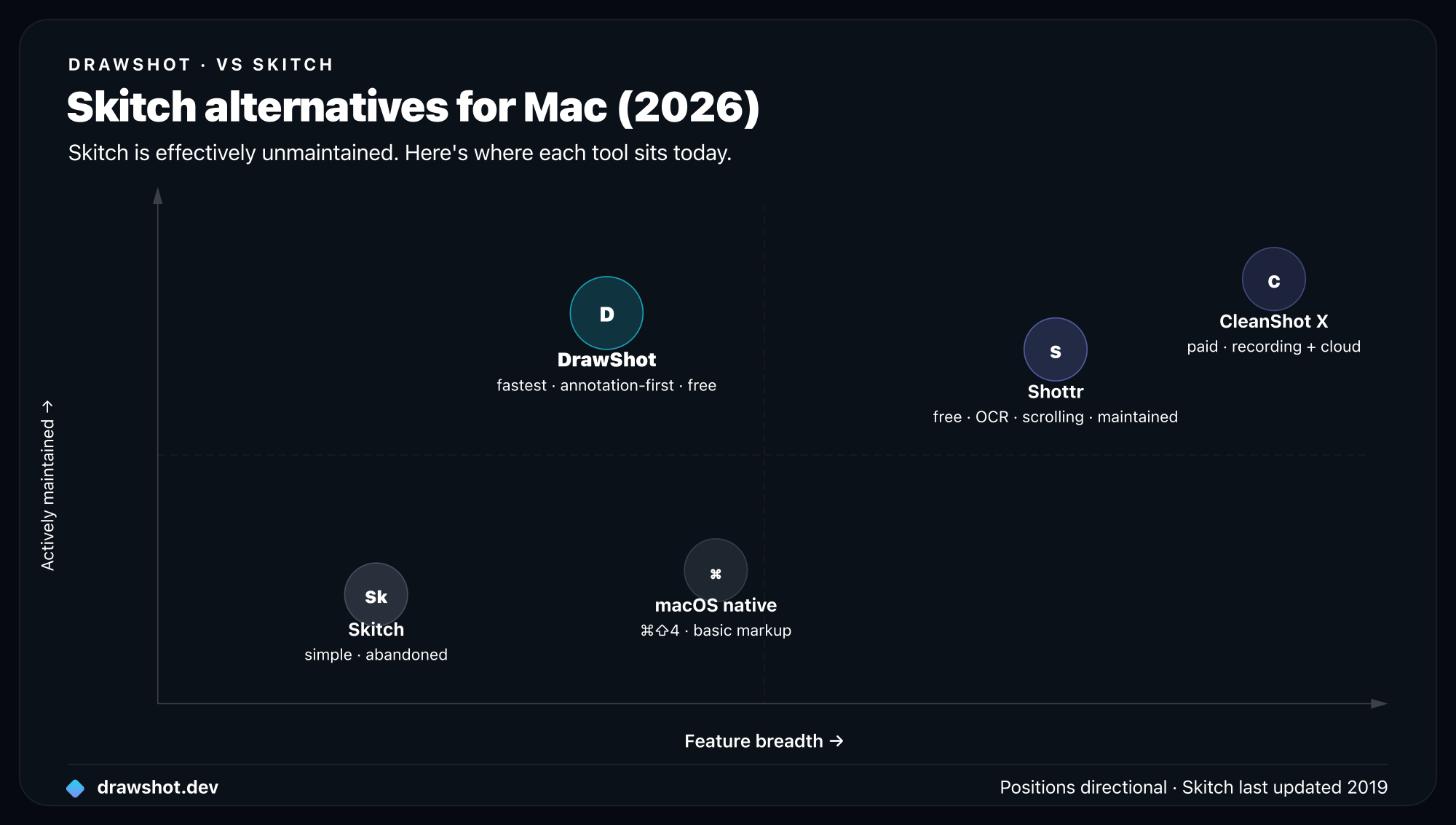
TL;DR: The best free Skitch alternative for Mac in 2026 is DrawShot — a ~22MB menu-bar annotator with 11 single-key tools that's free for its full core, 100% local, signed and notarized, and runs on current macOS. It captures the exact thing Skitch users loved (fast, annotate-first, free) without the abandonware risk. If you need OCR or scrolling today, look at Shottr; if you need recording, CleanShot X.
What Skitch did well
It's worth being honest about why people loved Skitch, because the answer is also the spec for its replacement.
It was fast and annotate-first. Skitch wasn't a heavy capture suite. You grabbed an image, marked it up with arrows, boxes, text, and a highlighter, and dragged it where it needed to go. The whole loop was quick, and the editing surface was friendly — that's what made it stick.
It was free. No license, no subscription, no math. For students, support folks, designers, and anyone who just needed to point at something, free was the right price.
It got out of the way. Minimal chrome, obvious tools, no learning curve. You didn't read a manual to put a red arrow on a screenshot. That simplicity is exactly what people miss.
If your mental model of "the perfect screenshot tool" is shaped by Skitch, you're looking for fast, simple, and free — not a maximal suite.
Where Skitch falls short now
The reasons to move off Skitch in 2026 are less about features and more about the fact that it's standing still.
It's effectively abandoned. Skitch is no longer actively maintained. There's no meaningful development, no modern-macOS hardening, and no roadmap. An unmaintained app on an OS that ships major changes every year is a slow-motion problem — things break and never get fixed.
It's stuck in the past on modern macOS. Old builds can feel dated, hit permission and compatibility friction on recent macOS, and may not be properly signed or notarized for today's Gatekeeper expectations. You're fighting the OS to keep an old app alive.
It was tied to Evernote. Skitch came out of the Evernote ecosystem, and that integration story is no longer the point for most people. If you're not living in Evernote, you're carrying baggage you don't use.
No path forward. Even if it runs today, there's no reason to expect it to keep up. Picking a maintained tool now saves you the migration later.
None of this means Skitch was bad — it was great in its moment. It just isn't a tool you should build a 2026 workflow on.
Skitch alternatives for Mac compared
Here's the quick comparison. Note which options are free and which are actively maintained — that second column is the whole reason you're reading this.
| Tool | Price | Annotation | Capture | Recording | OCR | Telemetry | Actively maintained | OS |
|---|---|---|---|---|---|---|---|---|
| Skitch | Free | Basic, friendly | Built-in | No | No | — | No (abandoned) | Old; creaky on modern macOS |
| DrawShot | Free core · Pro $9/yr (coming) | 11 single-key tools | Native ⌘⇧3/4/5 | No | Pro (coming) | None, ever | Yes | macOS 13+ |
| Shottr | Free · Pro ~$8 once | Solid | Built-in | No | Yes | — | Yes | macOS |
| CleanShot X | ~$29 once + cloud sub | Full set | Built-in | Yes | Yes | Optional | Yes | Recent macOS |
The read: if what you loved about Skitch was fast, simple, free annotation, DrawShot is the natural match — and it's maintained. If you also need OCR or scrolling today, Shottr. If you need recording, CleanShot X.
Why DrawShot is the natural successor
DrawShot is the closest thing to "Skitch, but alive and modern." It keeps the parts that made Skitch loved and drops the baggage.
Fast and annotate-first. DrawShot's whole pitch is that the screenshot "annotates itself." It doesn't add a new capture hotkey or a separate capture engine. It watches your Desktop, and the instant macOS writes a screenshot from the native shortcuts you already press — region (⌘⇧4), window (⌘⇧4 then Space), full screen (⌘⇧3), or the ⌘⇧5 menu — a Loom-style toast slides into the top-right corner. Click it and you're annotating. Same fast loop you remember, no new muscle memory.
Simple, single-key tools. The annotation surface is built for speed: 11 single-key tools — Draw (D), Arrow (A), Rectangle (R), Circle (O), Highlight (H), Eraser (E), Stamp (S), Blur (B), Crop (C), Callout (L), and Step numbers (N). No modifier chords. When you're done, ⌘S saves an annotated PNG to disk and copies it to the clipboard in one keystroke. That's the Skitch "draw an arrow, grab it, move on" loop, tightened. For a tool-by-tool walkthrough, see how to annotate a screenshot on Mac.
Free — and not abandoned. DrawShot's full core annotator is free with no signup. Unlike Skitch, it's actively developed, signed, and notarized for current macOS. A Pro tier is coming at $9/year (about $0.75/month, recurring) that adds OCR/image-to-text, AI Summarize, AI auto-naming (Smart Name), capture history, device mockups, and iCloud share links — making it the cheapest pro screenshot tool. But the annotation you came for stays free.
Local and private, by design. Everything is 100% local — no cloud, no telemetry, no analytics, no account. It's a tiny ~22MB universal binary (Apple Silicon and Intel), menu-bar only, on macOS 13+. The opposite of an old app fighting Gatekeeper: a current, notarized one that just works.
For the wider field, see our best screenshot tool for Mac roundup.
Who should pick something else
DrawShot matches the Skitch use case, but it's deliberately narrow. If any of these is core to your day, pick a different tool:
- You need OCR / image-to-text today. DrawShot's OCR is a coming Pro feature, not shipped. Shottr has on-device OCR now and is free — start there.
- You need scrolling capture. DrawShot doesn't stitch long pages. Shottr and CleanShot X do.
- You need screen or GIF recording. DrawShot is a screenshot annotator, full stop — no video. If you ship clips, CleanShot X is the like-for-like.
- You want zero install for the rare markup. macOS Markup (⌘⇧5 then edit in Preview) is free and already on your Mac. The ceiling is low — no single-key tools, no toast workflow, no instant save-and-copy — but for once-a-week use it's enough.
If none of those apply and you just want fast, simple, free annotation on a maintained app, DrawShot is the pick.
So which Skitch alternative should you pick?
- Want the Skitch feeling — fast, simple, free — on a tool that's actually maintained? DrawShot. ~22MB, free core, single-key tools, instant toast workflow on the macOS shortcuts you already press.
- Need OCR or scrolling capture today, for free? Shottr.
- Need real screen recording on a Mac? CleanShot X (~$29).
- Just need the rare basic markup? macOS Markup, already installed.
Skitch was the right tool for its time. For 2026, you want the same instincts on something that's alive — and for most former Skitch users, that's DrawShot.
Download DrawShot free → · See pricing
FAQ
Is Skitch still available? Skitch by Evernote is no longer actively maintained — it's effectively abandoned. Old downloads may still run on some Macs, but there are no real updates, and it's stuck in the past on modern macOS. For a current, supported tool, you need a Skitch alternative.
What's the best free Skitch alternative for Mac? DrawShot is the closest spiritual successor — fast, annotate-first, 100% local, and free for its full core annotator. It has 11 single-key tools and saves-and-copies in one keystroke. Shottr is another strong free option, and macOS Markup is built in for the basics.
Is DrawShot like Skitch? In spirit, yes — both are fast, simple, free annotation tools that get out of your way. DrawShot modernizes the idea: it's signed and notarized, runs on current macOS, is fully local with no telemetry, and reacts to the native macOS screenshot shortcuts instead of adding its own.
Does any Skitch alternative do OCR or video? DrawShot doesn't do OCR or recording today — OCR is a coming Pro feature, and it never records video. Shottr has OCR and scrolling capture now. CleanShot X does recording and cloud. Match the tool to what you actually need.
If what you miss about Skitch is the fast, simple, free annotation, DrawShot is the modern version of that — maintained, notarized, and local. Download DrawShot and try it on your next screenshot.
— Shraddha
DrawShot — free macOS screenshot annotator
Annotate your first screenshot in under 30 seconds. No account, no signup.
— Shraddha Mittal
Related reading