comparison · cleanshot-x
CleanShot X Alternative for Mac: Lighter & Cheaper
You press ⌘⇧4, drag a box around a bug, and now you need a red arrow, a blur over a token, and the image in your clipboard — fast. If that's 90% of why you opened CleanShot X, you're paying for a lot of machinery you rarely touch. This is about a smaller tool built for exactly that loop.
TL;DR: The best CleanShot X alternative depends on what you actually use. If you mainly capture, annotate, and paste — and don't need scrolling capture, screen/GIF recording, or cloud share links — DrawShot is a faster, lighter (~22MB), fully-local annotator with a free core and Pro at $9/year (coming). If you live in recording and cloud sharing, stay on CleanShot X; this won't replace it.
Why look for a CleanShot X alternative
CleanShot X is excellent, and I'll say that more than once in this post. But there are concrete reasons people go shopping:
You mostly annotate, not record. CleanShot X is a Swiss Army knife: scrolling capture, screen and GIF recording, cloud sharing with link tracking, OCR, pinned overlays, and years of polish. If your real workflow is "grab a region, draw an arrow, paste into Slack," most of that surface area is weight you scroll past.
Price shape. CleanShot X is around $29 one-time for the app, with a separate cloud subscription if you want its hosted sharing features. That's fair for what it is. But if you'll never touch the cloud, you may want something whose paid tier is built around the annotation work you actually do.
Install footprint and focus. A maximal capture suite is a bigger app with more menus, more settings, and more decisions per screenshot. Some people want the opposite: a menu-bar-only tool that does one job and gets out of the way.
Privacy posture. CleanShot's cloud is optional and useful, but if your default preference is "nothing leaves my machine," you may want a tool that has no cloud and no telemetry at all by design.
None of these mean CleanShot X is wrong. They mean the shape of the tool may not match the shape of your work.
DrawShot vs CleanShot X
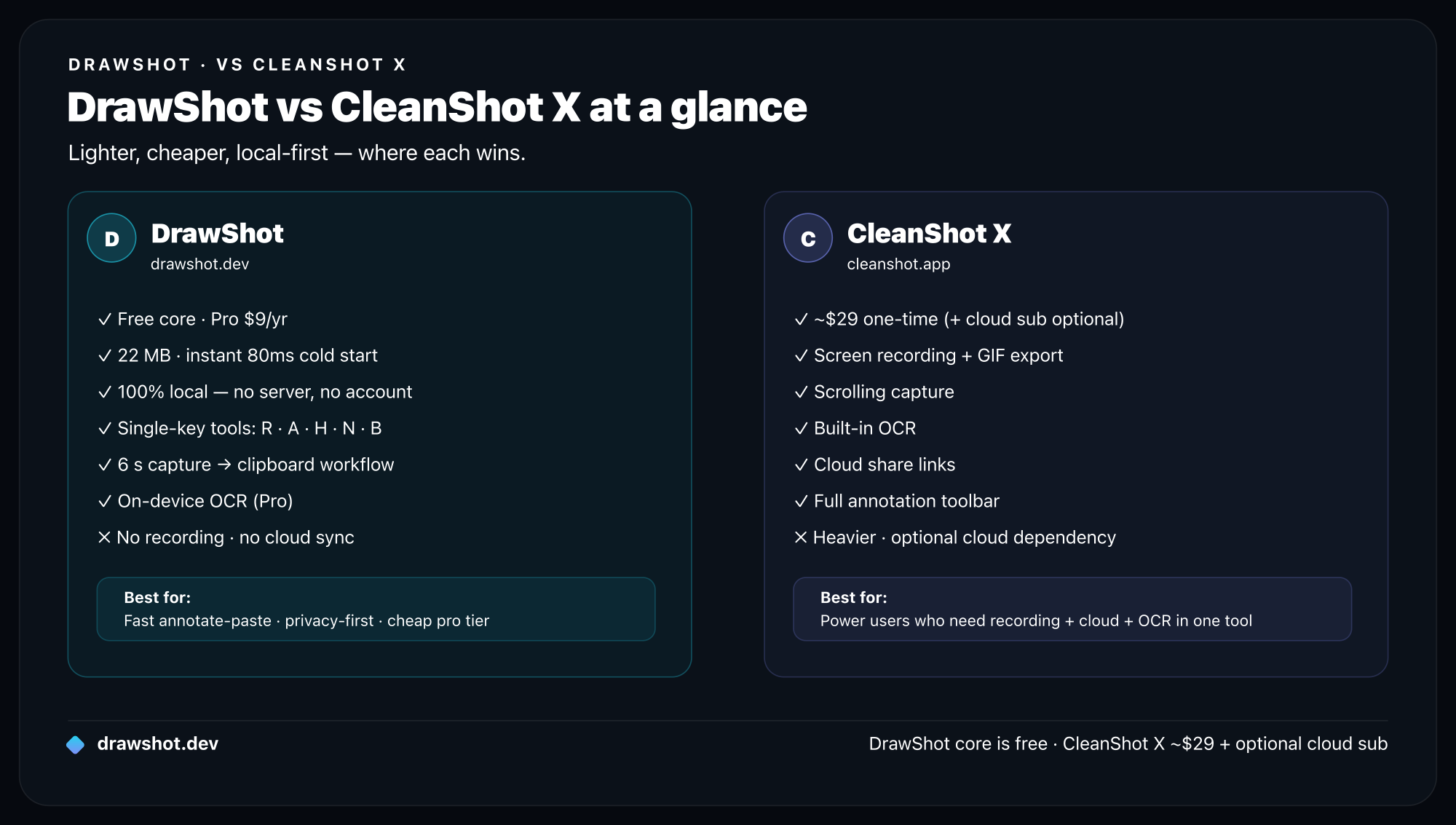
Here's the honest side-by-side. DrawShot is narrower on purpose; CleanShot X is broader on purpose.
| DrawShot | CleanShot X | |
|---|---|---|
| Region / window / fullscreen capture | ✓ (via native ⌘⇧3/4/5) | ✓ |
| Adds its own capture hotkey | No — reacts to native macOS shortcuts | Yes |
| Scrolling capture | No | ✓ |
| Screen / GIF recording | No | ✓ |
| Annotation tools | 11 single-key tools | Full set (modifier-based) |
| OCR / image-to-text | Pro (on-device, coming) | ✓ |
| Cloud share links + tracking | No | ✓ (cloud subscription) |
| Telemetry / analytics | None, ever | Optional, present |
| Account / login | None | Optional (for cloud) |
| Install size | ~22MB universal binary | Much larger |
| Price | Free core · Pro $9/yr (~$0.75/mo, coming) | ~$29 one-time + cloud subscription |
| macOS | 13+ | Recent macOS |
The one-line read: CleanShot X wins on breadth and recording/cloud. DrawShot wins on size, the auto-toast annotation loop, price of the paid tier, and a strict no-cloud privacy stance.
For a deeper head-to-head against the leading paid app — including a measured time-to-clipboard benchmark and pricing math — see DrawShot vs the paid alternative.
Where CleanShot X is still the better pick
I'm not going to pretend DrawShot replaces a tool I respect. If any of these is core to your day, stay on CleanShot X:
- Scrolling capture. DrawShot does not stitch long pages or scrollable containers. CleanShot X's scrolling capture is best-in-class. DrawShot is not the answer here.
- Screen and GIF recording. DrawShot is a screenshot annotator, full stop — no video, no GIFs. (It does need macOS Screen Recording permission to read pixels, but it never records.) If you ship short clips, CleanShot X wins immediately.
- Cloud share links with tracking. One-click upload to a short URL with view tracking, expiry, and password protection is a real, well-built feature. DrawShot has no cloud equivalent.
- Pinned overlays, deep export options, and six-plus years of polish. CleanShot X has accumulated a lot of thoughtful small features. DrawShot is young and deliberately minimal.
If you bought CleanShot X for the recorder and the cloud, that money is well spent. Keep it.
Where DrawShot wins
Now the other side. For the capture → annotate → paste loop, DrawShot is built to be faster and lighter.
The screenshot annotates itself. DrawShot watches your Desktop. The instant macOS writes a screenshot there — from the shortcuts you already use, ⌘⇧3, ⌘⇧4, ⌘⇧4-then-Space, or ⌘⇧5 — a Loom-style toast card slides in top-right (first-shot latency around 150–300ms). Click it and the annotation canvas opens. There's no new hotkey to learn, and the toast never steals focus.
11 single-key annotation tools. Every tool is one keystroke, no modifier chord: Draw (D), Arrow (A), Rectangle (R), Circle (O), Highlight (H), Eraser (E), Stamp/emoji (S), Blur/mosaic for redaction (B), Crop (C), Callout bubble (L), and auto-incrementing Step numbers (N). Four preset colors plus a custom wheel, three stroke weights, ⌘Z undo/redo. When you draw 30 arrows a day, single keys beat chords. See the full list in the annotation tools reference and the keyboard shortcuts.
One keystroke to done. ⌘S saves the annotated PNG to ~/Pictures/DrawShot/ and copies it to the clipboard in a single press. Esc discards. Median capture-to-annotated-image-on-clipboard in user testing is about 4 seconds.
A toast stack that survives a crash. Every shot in a session stays as a clickable card you can reopen. The stack is disk-backed, so a crash never loses your work — and it never grabs focus while you're typing.
100% local, by design. No cloud uploads, no telemetry, no analytics, no account. The only network call is an optional once-a-day update check. Even OCR (on Pro) runs on-device via Apple Vision. Nothing to opt out of, because nothing is on.
Tiny and notarized. Roughly 22MB, a universal binary for Apple Silicon and Intel, Apple-notarized, menu-bar only (a small "D" icon, no Dock icon). macOS 13+.
Pricing: free core, $9/year Pro
DrawShot's free tier is the whole annotator — all 11 tools, capture, the toast stack, ⌘S save-and-copy, basic backgrounds — with no signup and no paywall on capture or annotation. It's free to use.
Pro is $9 per year — about $0.75 a month — and it's coming soon, not shipping today. When it lands, Pro adds on-device OCR/image-to-text, AI Summarize, AI auto-naming ("Smart Name"), capture history/library, and the full backgrounds/mockups set. Nothing you use in free today gets moved behind it.
That's the positioning in one line: DrawShot is the cheapest pro screenshot tool — $9/year, $0.75/month — not a one-time purchase and not a recorder. CleanShot X's ~$29-plus-cloud model buys you far more breadth; DrawShot's free-plus-$9 model buys you the fastest annotation loop for the least money. Full details on the pricing page, or the full breakdown of everything in DrawShot Pro.
Who should switch (and who shouldn't)
Switch to DrawShot if you:
- Mostly capture, annotate, and paste — into Slack, Linear, GitHub, Figma comments, docs.
- Want the image on your clipboard in about 4 seconds, every time.
- Prefer single-key tools over modifier chords.
- Want a tiny, menu-bar-only app with zero cloud and zero telemetry.
- Like a free core that won't paywall the basics, with a cheap optional Pro later.
Stay on CleanShot X if you:
- Need scrolling capture, or screen/GIF recording.
- Rely on cloud share links with view tracking, expiry, or passwords.
- Want the broadest single capture suite with years of polish.
Or run both. Because DrawShot doesn't claim a capture hotkey — it just reacts to the native macOS shortcuts — the two coexist cleanly. Plenty of people keep CleanShot X for recording and cloud, and reach for DrawShot for everyday capture-to-paste. No conflict.
If you want to compare more broadly, see the best screenshot tool for Mac and the best free macOS screenshot tools.
FAQ
Is there a free CleanShot X alternative for Mac? Yes. DrawShot's free tier is the full annotator — all 11 single-key tools, native screenshot capture, the toast stack, and ⌘S to save and copy in one keystroke — with no signup and no paywall on capture or annotation. It's free. Pro ($9/year, coming) adds OCR, AI features, and capture history.
Does DrawShot do scrolling capture or screen recording like CleanShot X? No. DrawShot is a screenshot annotator, not a recorder. It has no scrolling capture and no screen or GIF recording. If you rely on those, CleanShot X is the better pick — stay on it.
How much smaller is DrawShot than CleanShot X? DrawShot is a universal binary of roughly 22MB that runs from the menu bar with no Dock icon. CleanShot X is a much larger, more feature-rich install. DrawShot trades breadth for size and speed.
Is DrawShot private? Does it upload my screenshots? DrawShot is 100% local — no cloud uploads, no telemetry, no analytics, no account. The only network call is an optional once-a-day update check. CleanShot X offers an optional cloud, which is great if you want share links, but it's a different trade-off.
Can I use DrawShot and CleanShot X together? Yes. DrawShot doesn't add its own capture hotkey — it watches your Desktop and reacts to the native macOS screenshot shortcuts. So it coexists with CleanShot X; many people keep CleanShot for recording and cloud, and reach for DrawShot for fast capture-to-paste annotation.
If your day is mostly capture → annotate → paste, DrawShot is the lighter, faster, cheaper half of that workflow — and the free core is genuinely free. Download DrawShot and try it on your next screenshot.
— Shraddha
DrawShot — free macOS screenshot annotator
Annotate your first screenshot in under 30 seconds. No account, no signup.
— Shraddha Mittal
Related reading