comparison · snagit
Snagit Alternative for Mac: Lighter, Cheaper Picks
Snagit is a genuinely capable tool. But for a lot of Mac users it's a Swiss-army knife bought to open one envelope — you paid around $60–65 for a heavy capture-and-recording suite, and 90% of your actual usage is "grab a screenshot, draw an arrow on it, paste it into Slack." If that's your reality, there are lighter, faster, and often free Mac apps built for exactly that job.
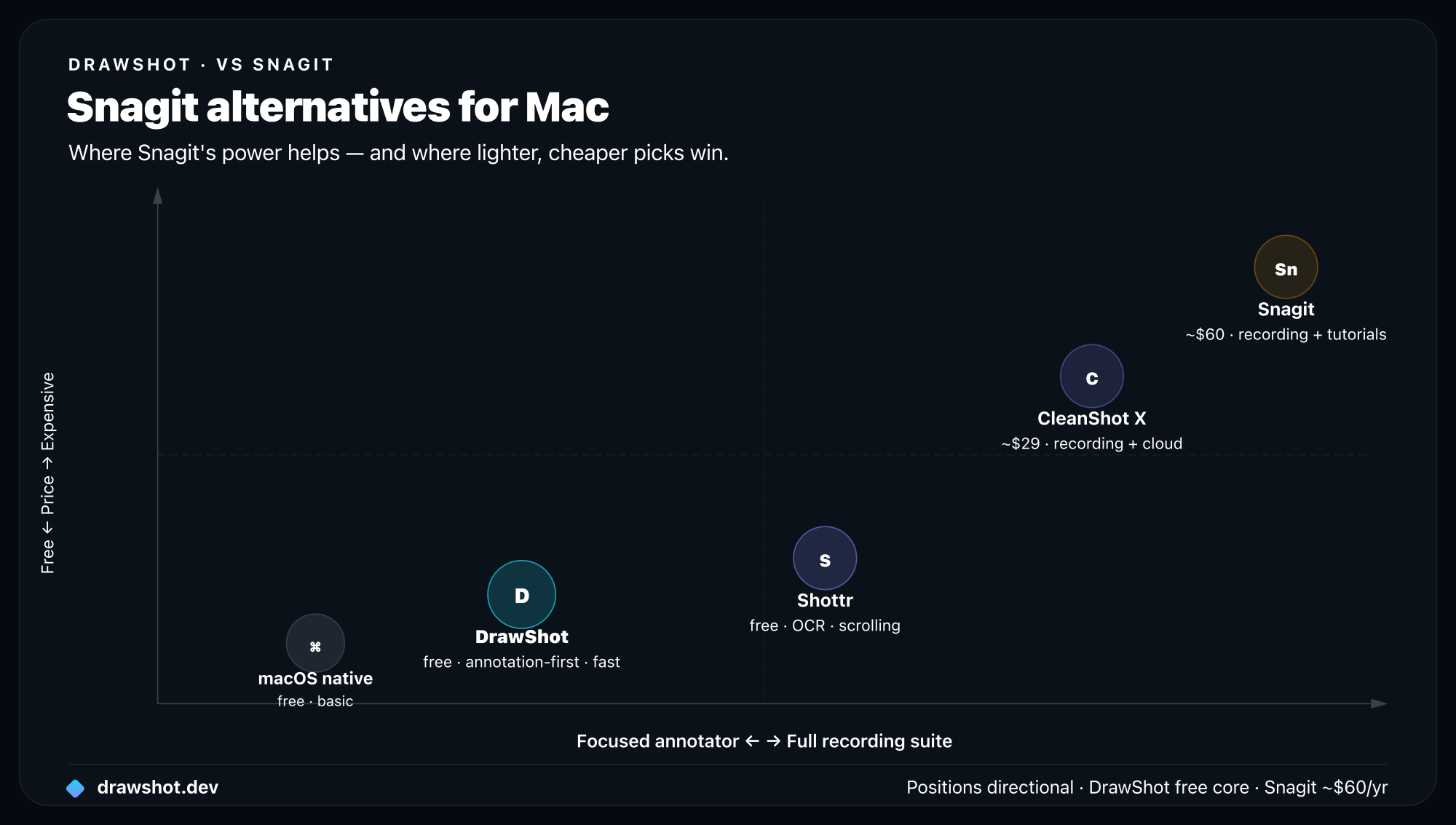
TL;DR: The best Snagit alternative for Mac depends on what you actually do. For fast capture-and-annotate, DrawShot is a 22MB menu-bar app that's free (Pro is $9/year). For a free do-everything capture tool with OCR and scrolling, pick Shottr. If you specifically need Snagit-style screen recording on a Mac, CleanShot X ($29) is the closest match. For the absolute basics, macOS Markup is already on your machine.
Why people look for a Snagit alternative on Mac
Three reasons come up again and again.
Price. Snagit runs around $60–65 for a one-time license, and historically you pay again for major version upgrades or a maintenance plan to stay current. For an app that, for many people, just annotates screenshots, that's a lot — especially next to free tools that do the same annotation job.
Weight. Snagit is a full desktop suite: a large install, a capture engine, an editor, and a media organizer. It's heavier and slower to launch than a focused menu-bar utility. On a Mac where you want a screenshot annotated and pasted in a few seconds, the suite's heft is friction you feel every single time.
You don't use the expensive parts. Snagit's headline features — screen video recording, step-by-step tutorial templates, a big organized capture library, scrolling capture — are real and valuable. But be honest about your workflow. If you've never recorded a screencast, never built a numbered tutorial, and never gone back to the library to find an old grab, you're paying for capabilities you don't touch. A lean annotator covers what you actually do.
The flip side, which we'll cover at the end: if you do use those features, none of these alternatives replace them. Keep Snagit. This guide is for everyone else.
Snagit alternatives for Mac compared
Here's the quick comparison. Note which options are free.
| Tool | Best for | Recording? | Scrolling capture? | Price | Platform | Install size |
|---|---|---|---|---|---|---|
| DrawShot | Fast capture + annotation, keyboard-first | No | No | Free · Pro $9/yr | macOS 13+ | ~22MB |
| Shottr | Free do-everything capture (OCR, scrolling) | No | Yes | Free · Pro ~$8 once | macOS | ~9MB |
| CleanShot X | Snagit-style recording on Mac | Yes | Yes | ~$29 | macOS | Heavier |
| macOS Markup | The basics, zero install | No | No | Free (built in) | macOS | Built in |
| Snagit | Recording, templates, big library, Windows | Yes | Yes | ~$60–65 once | Mac + Windows | Large |
The pattern: if your job is capture-and-annotate, the lighter tools win on speed, size, and price. The moment you need recording or a managed library, the picture changes.
DrawShot — best for fast capture and annotation
Best for: people who mostly capture a screenshot, mark it up, and paste it — fast.
DrawShot's whole pitch is that it "annotates itself." It doesn't add another hotkey or capture engine. It watches your Desktop, and the instant macOS writes a screenshot from the native shortcuts you already use — region (⌘⇧4), window (⌘⇧4 then Space), full screen (⌘⇧3), or the ⌘⇧5 menu — a Loom-style toast slides into the top-right corner in about 150–300ms. Click it and you're annotating. No new muscle memory, no learning a separate capture tool.
The annotation surface is built for speed: 11 single-key tools — Draw (D), Arrow (A), Rectangle (R), Circle (O), Highlight (H), Eraser (E), Stamp (S), Blur (B), Crop (C), Callout (L), and Step numbers (N). Four preset colors plus a custom wheel, three stroke weights, and ⌘Z to undo. When you're done, ⌘S saves an annotated PNG to ~/Pictures/DrawShot/ and copies it to the clipboard in one keystroke. Median capture-to-clipboard is about four seconds. See the full annotation tools reference for the complete kit.
It's tiny and private by design: around 22MB, universal (Apple Silicon and Intel), menu-bar only with no Dock icon, Apple-notarized, macOS 13+. Everything is 100% local — no cloud, no telemetry, no account, no analytics. The only network call is an optional daily update check. The toast stack keeps your session's shots disk-backed so a crash won't lose work, and it never steals focus.
On price, DrawShot's full core annotator is free with no signup. A Pro tier is coming at $9/year (about $0.75/month) that adds on-device OCR (image-to-text via Apple Vision), AI summarize, AI auto-naming, capture history, and full backgrounds. That makes it the cheapest pro-tier Mac annotation tool — a fraction of Snagit's one-time cost, even before you weigh upgrades.
What DrawShot is not: it's an annotator, not a recorder. No video or GIF capture, and no scrolling capture. If those are dealbreakers, read on.
Download DrawShot free · See pricing
Shottr — best free Snagit alternative
Best for: people who want one free tool that does almost everything.
If "free" is your top filter and you want more than annotation, Shottr is the strongest pick. It's a lightweight macOS app (around 9MB) that bundles capture with OCR, scrolling capture, and pixel-level measurement tools — several of which Snagit charges for. The free tier is genuinely generous, and Shottr Pro is roughly an $8 one-time purchase for the advanced extras.
Compared to DrawShot, Shottr trades a little of the dedicated keyboard-first annotation flow for a broader capture feature set you get today (notably scrolling capture and built-in OCR). If you want a single free utility to replace Snagit's capture side and don't need recording, Shottr is the one to try first. We go deeper in DrawShot vs Shottr and in our roundup of the best free macOS screenshot tools.
What it doesn't do: like DrawShot, Shottr is not a screen recorder. No video, no GIFs.
CleanShot X — best for Snagit-style recording on Mac
Best for: people who actually use Snagit's recording and want it on a Mac.
This is the honest like-for-like if recording is non-negotiable. CleanShot X (around $29) is a premium Mac app that includes screen recording, GIF capture, scrolling capture, and cloud sharing alongside its capture-and-annotate tools. If the reason you bought Snagit was screencasts and quick GIFs, CleanShot X is the alternative that keeps that capability while being a more focused, Mac-native experience — and cheaper than Snagit up front.
It's a paid premium app, not a free utility, so it's overkill if you only annotate. But it's the right call when you need the recording. For a full breakdown, see our CleanShot X alternative guide.
macOS Markup — best for the basics, already installed
Best for: occasional users who don't want to install anything.
Don't overlook what's already on your Mac. The built-in screenshot tools (⌘⇧3 / ⌘⇧4 / ⌘⇧5) plus Preview's Markup give you free, native, basic annotation — arrows, text, shapes, and a highlighter — with zero install. For someone who annotates a screenshot once a week, that may be all you need.
The ceiling is low, though: no single-key tools, no toast workflow, no blur or step numbers, no instant save-and-copy in one keystroke, and the editing surface is clunky for anything beyond a quick arrow. It's the floor, not a Snagit replacement for daily work. We compare it against dedicated tools in our best screenshot tool for Mac guide.
When to keep Snagit
The point of this guide isn't that Snagit is bad — it's that it's often more tool than the job needs. But if any of the following describe you, keep Snagit, because none of these lighter alternatives replace them:
- You record screen video or screencasts. Snagit's recording (and CleanShot X's, on the alternatives side) is a core feature DrawShot, Shottr, and macOS Markup simply don't offer.
- You build step-by-step tutorials. Snagit's numbered step templates and tutorial workflows are purpose-built for documentation and training material.
- You rely on a big organized capture library. Snagit's media organizer for finding, tagging, and reusing old captures has no equivalent in a lean menu-bar app.
- You need scrolling capture every day. Snagit, CleanShot X, and Shottr have it; DrawShot and macOS Markup don't.
- You're on Windows, or split across Mac and Windows. Snagit runs on both. DrawShot, Shottr, CleanShot X, and macOS Markup are Mac-only.
If two or more of those are true, Snagit earns its price. If none are — and for a lot of people, none are — you're paying for a suite to do a utility's job.
So which Snagit alternative should you pick?
- Mostly capture and annotate, want it fast and free? Start with DrawShot — ~22MB, free, single-key tools, and an instant toast workflow on the macOS shortcuts you already press. Pro is $9/year when you want OCR and AI.
- Want one free tool that also does OCR and scrolling capture? Shottr.
- Need real screen recording on a Mac? CleanShot X (~$29).
- Just need the rare basic markup? macOS Markup, already installed.
For most people leaving Snagit, the annotation job is the whole job — and a fast, private, free tool does it without the weight or the price tag.
FAQ
What is the best free Snagit alternative for Mac? Shottr is the best fully free option — around 9MB, with OCR, scrolling capture, and measurement tools built in. DrawShot is also free for its full core annotator, with a $9/year Pro tier coming for OCR and AI. macOS Markup (⌘⇧5) covers the basics at no cost.
Is there a Snagit alternative for Mac that records video? If you need Snagit's screen recording or screencasts on a Mac, CleanShot X (around $29) is the closest like-for-like and adds GIF capture, scrolling, and cloud. DrawShot, Shottr, and macOS built-in are annotators and capture tools — they do not record video.
How much does Snagit cost compared to the alternatives? Snagit is around $60–65 as a one-time license (plus paid upgrades over time). DrawShot is free, with Pro at $9/year. Shottr is free with a roughly $8 one-time Pro. CleanShot X is around $29. macOS Markup is free and built in.
Why switch from Snagit if you already own it? Most people who reach for a Snagit alternative never use its recording, step templates, or library — they capture, annotate, and paste. If that's you, a 9–22MB Mac app does the daily job faster than a heavy suite, often for free or close to it.
DrawShot — free macOS screenshot annotator
Annotate your first screenshot in under 30 seconds. No account, no signup.
— Shraddha Mittal
Related reading