pro · pricing · announcement
Everything in DrawShot Pro ($9/Year)
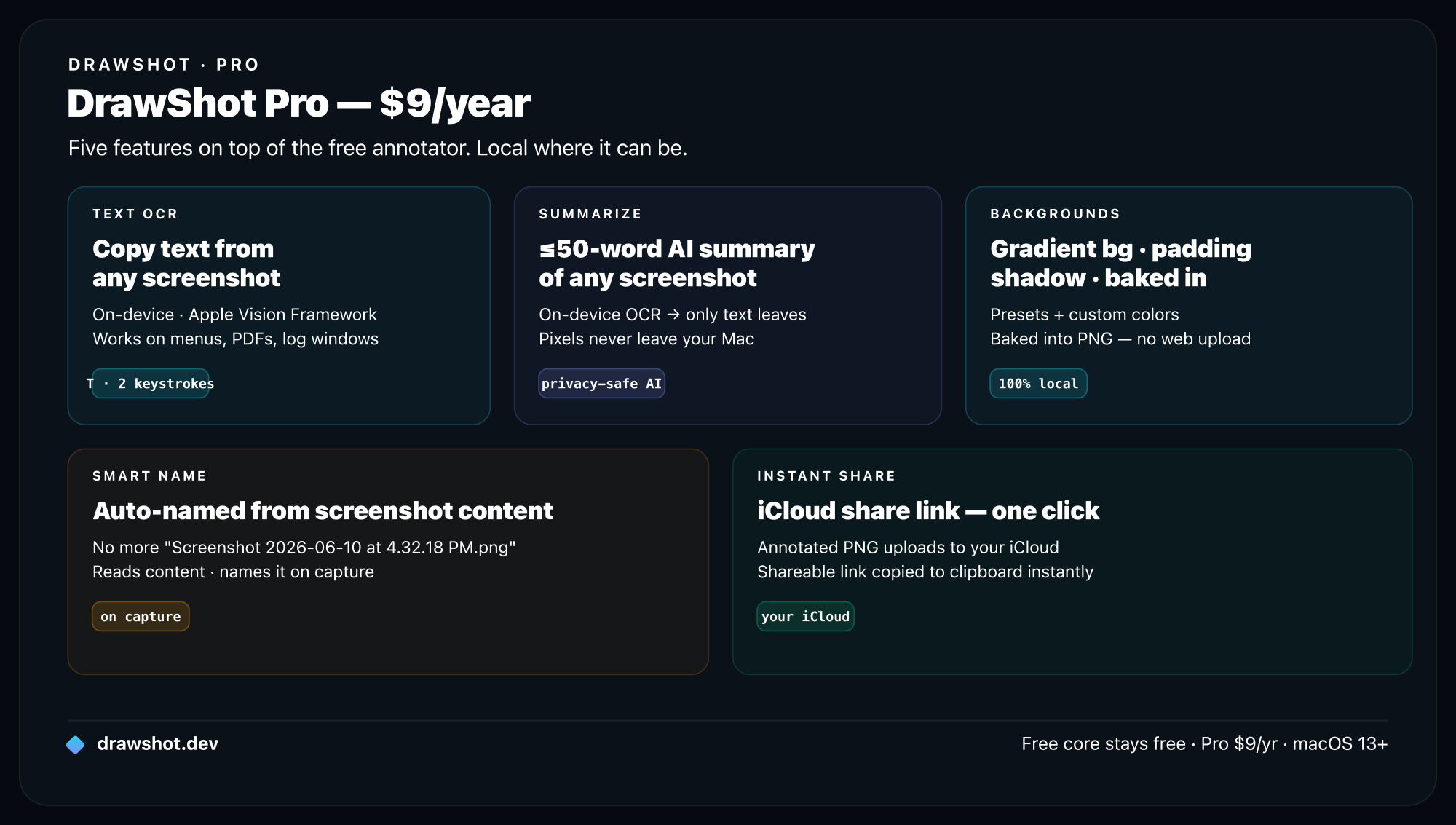
TL;DR: DrawShot Pro adds AI and power features on top of the free annotator for $9/year — about $0.75/month, the cheapest pro screenshot tier on Mac. You get Text OCR (copy text out of any shot, on-device), Summarize (a ≤50-word AI summary of the text), Smart Name (auto-named on capture), Backgrounds & Mockups (presets, palettes, padding, radius, shadow — baked into the export), an instant iCloud share link, and priority support. It's coming soon — get on the list on the pricing page. The free core annotator stays free, and nothing that's free today gets paywalled later.
I built DrawShot's free tier to be a genuinely complete screenshot annotator — capture, 11 single-key tools, blur, basic backgrounds, and ⌘S to save-and-copy in one keystroke, all 100% local. That's not a crippled demo; it's the thing I use every day, and it stays free.
So what's Pro for? Two buckets: AI features that read and act on the text in your screenshots, and power features that polish and move them faster. Here's everything that's coming, why it's paid, and exactly what stays free.
The AI features
These are the ones that needed a paid tier to exist — partly because the cloud summary has a real per-use cost, partly because they're the power-user upgrades.
Text OCR — pull text out of any screenshot
Press to OCR the whole image, or drag a box over just the part you want — a single order ID, one line of an error — and the text lands on your clipboard, ready to paste. It runs 100% on-device using Apple's Vision framework, so the pixels never leave your Mac. No retyping a serial number, an error string, or a quote from a slide ever again. Full walkthrough: how to extract text from a screenshot on Mac.
Summarize — a ≤50-word AI summary of the text
For a screenshot that's too long to read and too important to ignore — a wall-of-text stack trace, a dense policy block, a busy dashboard — Summarize gives you a handful of short bullets with the gist. It does on-device OCR first, then sends only the recognized text to a cloud model (never the image), and hands back a ≤50-word summary you can copy or stamp directly onto the shot. The privacy architecture is the whole point — here's how it works.
Smart Name — auto-named the moment you capture
No more Screenshot 2026-06-10 at 4.32.18 PM.png graveyard on your Desktop. Smart Name reads what's in the shot and gives it a sensible, findable filename the instant you capture — so a folder of screenshots is actually searchable later instead of a wall of timestamps.
The power features
These don't need AI — they're about making screenshots presentable and getting them out the door faster.
Backgrounds & Mockups — turn a raw shot into a presentable one
A raw screenshot is the wrong shape and has no breathing room. Backgrounds & Mockups fixes that inside the app, no web uploader: size & aspect presets (Original / Square / Wide / Tall / Social), background colours (8 presets + 8 saveable palette slots for your brand + a custom picker), padding, corner radius, and shadow — all baked into the exported PNG, so what you see is the file you share. Deep dive: how to add a background to a screenshot on Mac.
Instant iCloud share link
Capture, then get a shareable link without leaving DrawShot — for when a paste won't do and you need a URL to drop in a message. Uses your own iCloud, so the file is yours.
Priority email support
Pro users go to the front of the queue. Real replies from the person who builds the app — not a ticket black hole.
What stays free
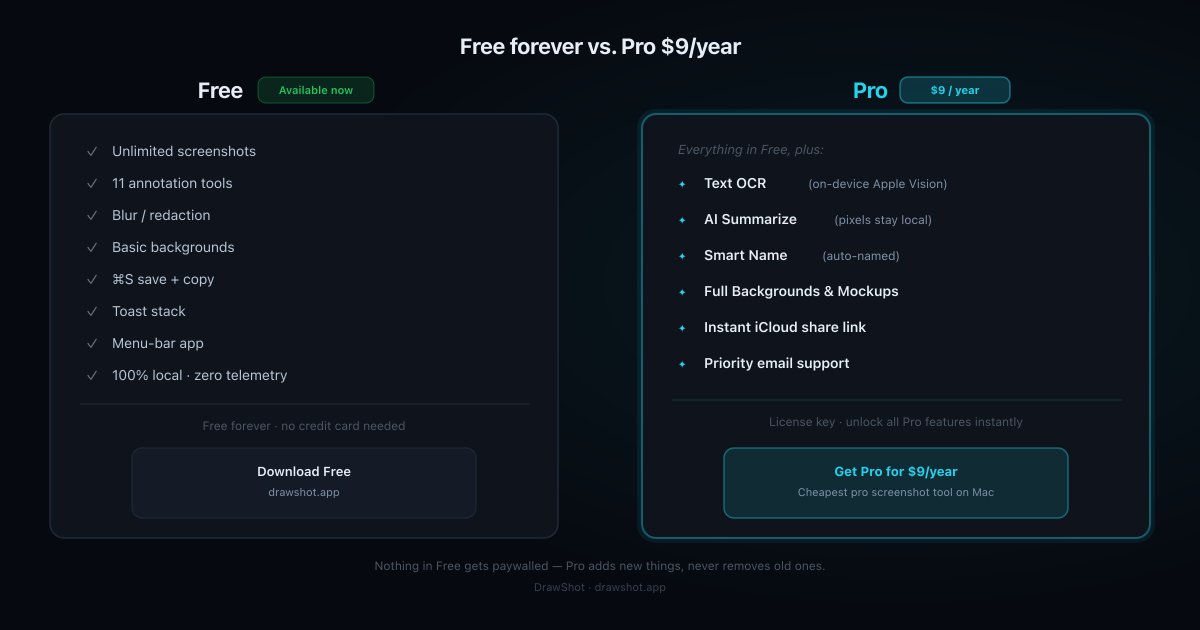
This matters, so it's worth being plain about. The free core annotator is not going anywhere, and no feature that's free today will be moved behind the paywall later. Pro adds new things; it doesn't gate old ones. The free tier keeps:
- Unlimited screenshots, 100% local, zero telemetry
- 11 annotation tools — arrow, blur, crop, callout, step numbers + 6 more, all single-key
- Blur for one-key redaction (how to blur a screenshot)
- Basic backgrounds, photo filters, 4 colours + custom wheel
⌘Ssave-and-copy — annotated PNG to disk and clipboard in one keystroke (the four-seconds-to-clipboard story)- The Loom-style toast stack and menu-bar app
If you never want the AI or the polish, the free version is a complete tool. I use it daily and would even if I weren't the one who made it.
Why $9/year (and why recurring)
Straight answer: recurring revenue is what lets a solo developer keep shipping — and what covers the real per-use cost of the cloud summary. A one-time price would mean either no ongoing development or a higher upfront number. $9/year — about $0.75/month — keeps it the cheapest pro tier around while funding the work.
For comparison, the paid alternatives run roughly $29 upfront plus ~$19/year for updates. DrawShot Pro is a fraction of that, and the free tier means you can run the core without paying anything. (More on how it stacks up: DrawShot vs CleanShot X and the best screenshot tool for Mac roundup.)
Frequently asked questions
What's included in DrawShot Pro? DrawShot Pro adds AI and power features on top of the free annotator: Text OCR (on-device, copy text out of any screenshot), Summarize (a ≤50-word AI bullet summary of the text in a shot), Smart Name (auto-named the moment you capture), Backgrounds & Mockups (size/aspect presets, background colours, padding, corner radius, shadow — baked into the export), an instant iCloud share link, and priority email support.
How much is DrawShot Pro? DrawShot Pro is $9/year — about $0.75/month. It's a recurring subscription that funds ongoing development and the per-use cost of the AI features. That's the cheapest pro screenshot tier on Mac and far less than the paid alternatives, which run roughly $29 upfront plus ~$19/year for updates.
Is DrawShot free? What's the difference between Free and Pro?
Yes — the core annotator is free and stays free: unlimited captures, 11 annotation tools, blur, basic backgrounds, and ⌘S save-and-copy, all 100% local. Pro adds the AI features (OCR, Summarize, Smart Name) and power features (full Backgrounds & Mockups, instant share, priority support). Nothing that's free today gets moved behind the paywall later — Pro adds new things, it doesn't take old ones away.
When does DrawShot Pro launch? Pro is coming soon — we're focused on getting the free core annotator right first. Get on the list on the pricing page and you'll be the first to know when it goes live, at $9/year.
Are DrawShot Pro's AI features private? Mostly on-device. Text OCR runs 100% on your Mac using Apple's Vision framework — the image never leaves. Summarize does on-device OCR first and sends only the recognized text to a cloud model, never the pixels. So your screenshots stay on your machine; at most, extracted text travels for the summary.
$9/year. The cheapest pro screenshot tier on Mac.
OCR, AI summaries, Smart Name, Backgrounds & Mockups, instant iCloud share — all on top of a free annotator that stays free. Get on the list and you'll be first to know when Pro ships.
Get on the Pro list →Or download the free annotator now — the full capture and annotation core is live today. Pro features land on top when they ship.
— Shraddha
Everything in Free, plus AI features, screenshot history, and iCloud share links. Pro launching soon at $9/yr.
Free core tools · no account required · Apple Silicon native
— Shraddha Mittal
Related reading